Meet Sam, a passionate gamer who just got a Steam Gift card as a birthday gift. Like many others, Sam wanted to know how much balance is on his Steam card. But the challenge is that you can't check the exact balance until you redeem it. Then how to check Steam card balance without redeeming it?? Is it even possible or not?? This thing is going to be addressed in detail!
Sam has found some easiest and authentic ways to check Steam Card balance. Through these simple methods, you'll stay in control of your Steam wallet, which will make your gaming experience more enjoyable! Let's start!
What is a Steam Wallet Code?
Steam Wallet code is a specific 15-digit code that comes with Steam gift cards, either digital or physical gift card. Below are some uses of Steam Wallet Code;
⭐ The code is needed while checking the Steam card balance before redemption
⭐ You can add funds to your Steam Wallet using this 15-digit code
⭐ The money you get using the code can be used to purchase games, downloadable content and much more!
⭐ The Steam Wallet code can also be used as a gift for someone and the recipient can make purchases of their choice.
⭐ You can manage your spending without needing cash or credit card via Steam wallet code.
Note: Using that code, you can gift this card to your friends on the official Steam website. https://store.steampowered.com/digitalgiftcards/https://store.steampowered.com/digitalgiftcards/
Steam Card Balance Check After Redemption
There are different steps explained for Steam Card balance check after redeeming!
Check Steam Gift Card Balance via Steam Website
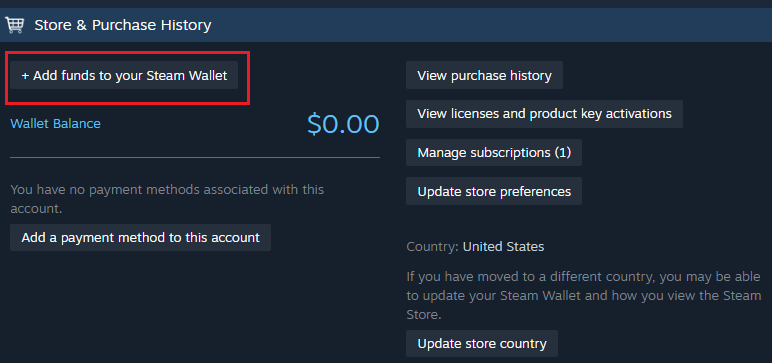
To check your Steam card balance, first log in to your Steam account on the website. Then, click on "Account Details" in the top right corner. On this page, select the "Add Funds" option, where your current Steam Wallet balance will be displayed. This allows you to easily verify your remaining balance after redeeming a gift card and helps you manage your funds for future purchases.
Verify Steam Balance using Steam Desktop Application (Steam Client)
You can also check your Steam balance using the Steam desktop application. Open the Steam Client on your PC, click on your profile, and go to "Account Details." Your updated Steam Wallet balance will be displayed on this page, allowing you to quickly see how much funds you have available for future game purchases.
How to Check Steam Card Balance using Steam Mobile App
You can also check your Steam gift card balance using the Steam mobile app, which is very convenient when you don’t have access to a computer. First, log in to your Steam account on the app. Then, tap the menu icon (three horizontal lines) in the top-left corner of the screen. From the menu, go to the “Store” section, and then select “Account Details.” Your Steam Wallet balance will be displayed on this page. This method allows you to quickly and easily confirm your updated balance anytime and anywhere, making it very handy for managing your funds on the go.
Confirm Updated Balance via Steam Wallet Transaction History
You can also do a Steam wallet balance check using Steam wallet transaction history. Here is the process;
After logging in to your Steam account, go to "Account Details." On this page, you will find the option "View Transaction History," where you can check all your past purchases, gift card redemptions, and other account activities. It showed me all the details regarding my previous purchases. Here is how this feature can help you in many ways
⭐ It shows every transaction made with your Steam Wallet, including game purchases, in-game items, and gifts. You always get to know where you spent your money.
⭐ The transaction history clearly shows every time you add new funds to your Steam Wallet. After each purchase or fund addition, the history updates your available balance.
⭐ It lists all the transactions separately, which entries are for adding funds and which are for spending. It provides the name of purchase you made, time, date and amount spent. It can help to manage your budget effectively.
⭐ If you have any issue regarding adding funds, redemption, purchase or any verification, the transaction history is your main evidence. It gives a detailed record of your Steam wallet activity.
Why Steam Don't Show Balance Until Your Redeem Your Code?
Steam will not display any gift card balance in your account until you actually redeem the gift card code. This is because Steam has no way of knowing whether the card is real, valid, activated, or loaded with money until you enter the code. When you redeem the card, Steam checks its system to confirm the card’s value and make sure it hasn’t been used before.
This process works as a security measure to protect users. It prevents situations where someone tries to check or use a fake, inactive, or already-redeemed code. By only revealing the balance after successful redemption, Steam reduces the chances of scams, incorrect balances, or fraudulent activities. However, if you are finding any error while Steam card balance checks, contact Steam team!
Can you Convert Steam Card Balance to Cash?
No, the balance can be withdrawn in cash or transferred to any other account. You can use your balance to buy games, digital content and other items from the Steam platform. But if you have a Steam gift card and you don't want to add funds to your Steam account. Then, you can also sell it for cash on TradeCard. Selling your Steam card on TradeCard is super-easy. Here is what you need to do;
Log in to Your TradeCard Account > Select Steam Gift Card from homepage > Enter Card Details > Upload Gift Card Image > "Tap on Start Trade" to trade gift cards > Get Your Money Right Away
Protecting Your Balance: Steam Card Security
In order to protect your Steam card balance, never share it with anyone. Always redeem your gift card using the official Steam website. If you are using public WiFi, it can drag you into Steam gift card scams. If your card gets lost or stolen, contact Steam Support as soon as possible. They may not always be able to recover the balance, but informing them early can help them guide you on the next steps. However, if someone has already redeemed your code, Steam cannot reverse the transaction or restore the funds, which is why protecting your card and code from the start is extremely important.
FAQ's
- Can I check my Steam gift card balance without redeeming it?
You can check the balance by entering the 15-digit wallet code on Steam’s redeem page. However, Steam won’t show the value until the code is verified for security reasons.
2. How can I check my Steam wallet balance after redeeming the card?
Log in to your Steam account → Go to Account Details → Your wallet balance will appear. You can also check it through the Steam app or desktop client anytime.
3. Why is my Steam card balance not showing up?
It may take a few minutes to update after redeeming. Ensure you entered the correct code or contact Steam Support for help.
4. Can I transfer or withdraw my Steam balance as cash?
No, Steam balance cannot be withdrawn or transferred once redeemed.But you can sell your unused gift card for cash through TradeCard.