If you’ve ever faced a Steam card error, you know how annoying it can be! The error message can pop up at the worst possible time especially when you are topping up your account or going to purchase something. These include invalid cards, regional restrictions, or codes that have already been redeemed. These Steam gift card errors are more common than you might think, and they can leave even experienced users scratching their heads. Behind these errors is a mix of simple mistakes, technical issues, and system restrictions that can easily be resolved once you know what to do. In this guide, we’ll break down the main Steam card errors, explain why they happen, and show you practical ways to fix them!
Steam Card Errors & How to Fix Them Quickly
Using Steam gift card codes, you add funds to your Steam account. But sometimes, you may face Steam card errors as well that can prevent you from redeeming codes successfully. Let us show you the list of these errors and how you can resolve them quickly!
🛑 Invalid Steam Gift Card Error
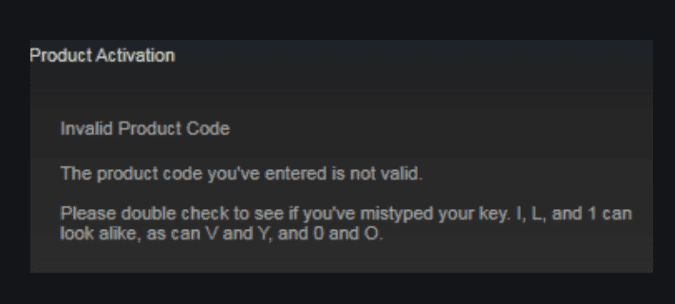
An invalid Steam gift card error can happen when Steam platform cannot recognize the code you entered during the redemption process. You may see messages like "Code Not Recognized", "Incorrect or Invalid Code". With this issue, getting these messages or pop-up notifications is normal. But what is not normal is not knowing the exact cause behind it. Here are some causes that can cause that error;
What is Causing Invalid Steam Gift Card Error?
- Steam codes mix letters and numbers, and it’s easy to confuse similar characters like 0 (zero) and O, or 5 and S. Even one wrong character will trigger the error.
- Sometimes, the card needs activation at the store or online before it can be redeemed. If the retailer hasn’t completed this step, the code will appear invalid.
How to Resolve it?
The solution is simple. Double check every detail while entering the code. Make sure that you confirm the Steam gift card activation from the retailer.
🛑 "Already Redeemed" Error
This Steam card error appears when Steam detects that the code you’re trying to use has already been redeemed. The system prevents multiple uses of the same code.
What is Causing this Error?
The most common cause of this Steam gift card error is that someone else redeemed the card, whether intentionally or accidentally. The other reason could be that if you have bought the card from unverified users, that also increases the risk of getting a previously used card.You may have forgotten that you have already taken the redemption step
How to Fix Already Redeemed Steam Card Error
The simple way is to check your Steam card balance to confirm that you've already used that code. You can also contact the retailer in order to request a replacement of Steam gift card. In most cases, this doesn't happen, but you can try it.
🛑 Regional Restriction Errors
A regional restriction occurs when a Steam card cannot be redeemed because the account’s registered country does not match the country the card was intended for. You might see messages such as “This code cannot be redeemed in your region” or “Code is region-locked" specifically for this type of Steam gift card errors.
What is Causing Steam Region Restriction Error?
Steam identifies your account’s country through registration details, IP address, and payment methods. If the card was purchased in a different country, Steam prevents it from being redeemed. Another reason can be related to game publishers pricing policies. Game publishers often set different prices for different countries due to local taxes, currencies, and economic conditions.
How to Resolve it?
Always check that your account region matches the card’s intended region before purchasing. Make sure that you only buy gift cards from the retailers that operate in your specific region. Similarly, while redeeming your Steam card code, avoid using VPN's as this may violate Steam's terms of service and risk account suspension.
🛑 "Steam Card Not Activated" Error
One of the frequent Steam card errors is the Steam card not activated error where you try to redeem a Steam card, but Steam cannot process it because the card hasn’t been activated at the point of sale. You might see messages like "This card cannot be redeemed at this time" or "Error Steam Card not Activated"
What Causes "Steam Card Not Activated" Error
There could be a lot of reasons for this error, like the cashier or online system did not properly activate the card when it was purchased. Occasionally, the activation process may fail due to network or server issues at the retailer’s end.
How to Resolve it?
Contact the retailer or online store where the card was purchased and request confirmation of activation. Wait a few minutes and retry redemption if activation is still in process. If the card still doesn’t work, reach out to Steam Support with proof of purchase, and they can manually verify and activate the code.
🛑 No Balance
When you complete your redemption process, you only see "no balance or zero balance". Annoying right? But why does it happen;
Why This Issue Happens
All processes related to redemption are linked with Steam's backend system. Sometimes during events, or any sales going on, this issue can also happen. Steam platform sometimes takes time to update your balance. If you have violated any Steam platform policy, it may temporarily hold your funds and show it later, such as multiple redemptions in a short period or purchases from different regions.
What Can I Do To Fix That Issue?
The first thing you can do is log out your Steam account and login again. Refresh the page and you may see your balance right there. When you enter the code and it's not showing, you can also leave the system & wait for 5-10 minutes till the balance shows. Make sure you check your internet connection as well, especially during redemption process. You can also try it by switching or changing devices. If this process is not working because of this Steam card error, then contact the Steam support team immediately.
🛑 Technical Issues
Technical issues are problems that prevent successful Steam card redemption due to backend, app, or connectivity problems. These are system-related errors rather than specific Steam card errors.
Why does it happen?
Steam occasionally updates its servers for maintenance, which can temporarily block card redemptions. During major sales, new game releases, or holidays, the influx of users can cause technical issues. For security concerns, Steam runs automated checks to prevent unauthorized use of codes, or suspicious activity, which can temporarily block redemptions until verified.
What Can You Do?
Because of technical errors, you can't do much at your end, but still you can try a few things. You can try doing redemption on Steam client (Desktop) as they can handle transactions better. The other thing is to check the internet connection. Make sure that you update your software or system weekly or monthly to avoid bugs or viruses. If the issue still continues, then contact the Steam support team with payment proof and relevant screenshots.
What Happens If You Ignore Steam card Errors?
If you ignore a Steam card error, it can quickly turn into a real headache. Your balance might not show up, or you could miss out on a game or in-game item you were looking forward to. Waiting too long might also cause confusion if you try redeeming the card multiple times. The best approach is to check the issue quickly and reach out to Steam Support. This way, you’ll know your money and your games are safe.
FAQ's
- Why does my Steam card show "Invalid Steam Gift Card Error"?
This usually happens when the code is entered incorrectly, contains a typo, or the card hasn’t been activated by the retailer. Double-check the code and confirm activation to fix this.
2. What should I do if my Steam gift card says "Already Redeemed"?
Check your Steam account balance first to see if the code was already used. If not, contact the retailer for a replacement, or reach out to Steam Support with proof of purchase.
3. Can I redeem a Steam card from another country?
Steam cards are region-locked, meaning your account’s registered country must match the card’s intended region. Using a card from a different region can trigger a Steam regional restriction error.