If you want to borrow airtime on Airtel, this is the right blog for you. Airtel's airtime borrowing plan is known as Airtel Extra Credit Service. You will need it when your airtime balance is low or zero. There are two main methods that you can use. One is the USSD code to borrow airtime on Airtel and the second one is using MyAirtel App. Using either method would let you receive a loan that you can pay back later. But how do these steps work and how can you repay that airtime loan?? This blog is a complete guide for Nigerian users to borrow Airtime. Let's start!
How to Borrow Airtime on Airtel Using Different Methods?
Using the USSD code
Borrowing airtime on Airtel using the USSD code is one of the fastest and most convenient methods available. This approach requires no internet connection and can be done directly from your phone. Here are the steps to using this method;
1. Dial the Code
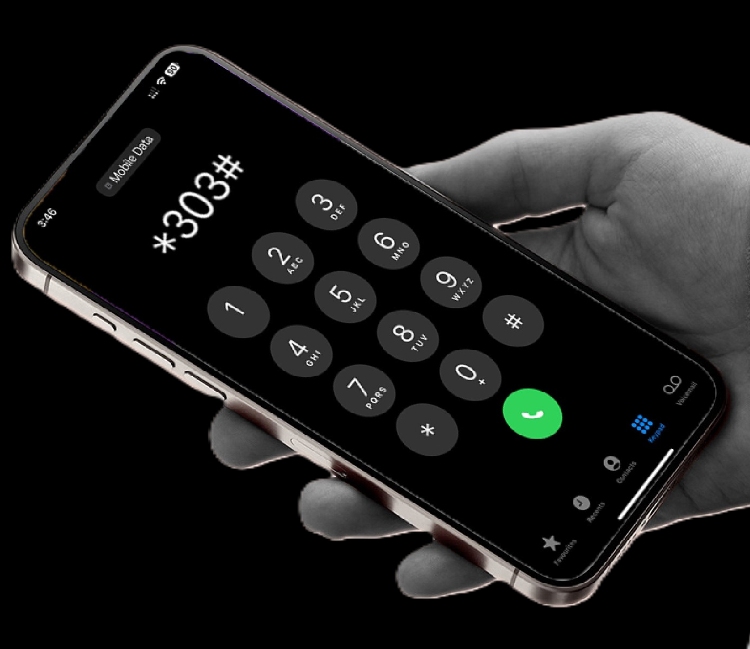
On your Airtel line, dial the code to borrow airtime on Airtel, which is *303#. This is the new USSD code that is used across different networks in Nigeria like MTN, Glo to borrow airtime. Previously, the code was *500# but now it has been changed.
2. Follow Prompts
After dialing the code, select "Borrow Airtime" from the list of services.
3. Choose Amount
- Select your desired amount from the available loan amounts.
2. Get a Confirmation SMS
3. You'll be credited instantly with borrowed airtime and get a confirmation SMS too.
Using the My Airtel App to Borrow Airtel Airtime
If you prefer the app-based solution, then you can borrow data from Airtel using this option. You'll need an internet connection to use this method.
1. Download the App & Sign-In
Download the MyAirtelApp from the App or Google store. Register or sign in to your account
2. Look for "Borrow Airtime"
On the home page, you'll find the option "Borrow Airtime". Click on it.
3. Eligibility Verification
The app will itself verify your eligibility and when you open the app, you can see it clearly on the dashboard.
4. Select the Desired Amount & Confirm
Based on your airtime need, choose the amount. Click on "Confirm". Your Airtel line will be credited immediately. You can start using your Airtime right away
Note: If there is some issue with your network and you need Airtime immediately, you can buy an Airtime from TradeCard using the "Pay Bills" option on the app. It is a gift card trading platform where you can sell your gift cards anytime for cash or your daily needs.m
Who is Qualified to Borrow Airtime on Airtel?
📶 You Must have an Active Sim
This means your Airtel line should be working properly, able to make calls, send SMS, and use data. You may not qualify if your SIM is blocked, suspended or has not been used for a very long time.
💾 You Must Have a Registered SIM
Your Airtel SIM needs to be registered with your correct personal details, as required by your country’s rules. This usually includes your name, ID information, and sometimes your address. Airtel may not allow you to use services like airtime loans if your SIM is not registered.
🔁You Must Use Your Line Consistently
Airtel checks how often you use your line for calls, SMS, and data. You should recharge and use your SIM for at least three months
🚫You Must Not Owe Any Loan
If you have borrowed airtime before, you need to pay it back fully before you can borrow it again. This repayment usually happens automatically from your next recharge
💰You Must Recharge a Minimum Amount
Airtel checks how much airtime you recharge in the last few weeks. If it’s too low, you may get a smaller loan or not qualify.
🪪You Must Link Your SIM to NIN
In many countries, you are required to link your SIM to a national ID (like NIN in Nigeria). If your line is not linked, Airtime loan service might get restricted
Mistakes to Avoid While Borrowing Data on Airtel
Not Checking the Loan Expiry Date
Borrowed data on Airtel comes with a limit. If you don't use it before it expires, you will lose your airtime.
Letting Airtime Finish Too Fast
If you don't set any airtime limits, it will finish too fast. Make sure that you turn off auto-play videos and stop background apps.
Not Checking the Loan Balance
Sometimes you use all of your airtime and wonder why it finishes so soon. Make it a habit to check the airtime loan balance on a daily basis. You can check the detailed method below to verify your loan balance.
How to Check Borrowed Airtime Balance on Airtel?
If you’ve borrowed airtime on Airtel and want to check your balance, it’s quick and easy to do directly from your phone. But remember that code to check the borrowed airtime balance is different from the main airtime balance on Airtel. The code to check the main Airtime balance is *310#
Note: *310# is the universal code to check main airtime balance across all networks in Nigeria.
Here are the steps;
1. Start dialing the code *121# on your Airtel line (code to check the borrowed airtime balance on Airtel)
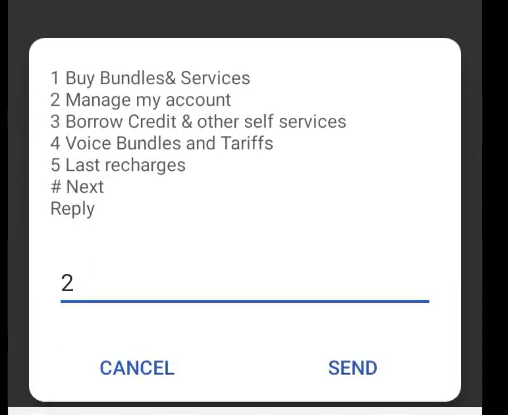
2. Select option 2 "Manage my account" from the displayed menu
3. Then, select option 2, "My Airtime Balance"
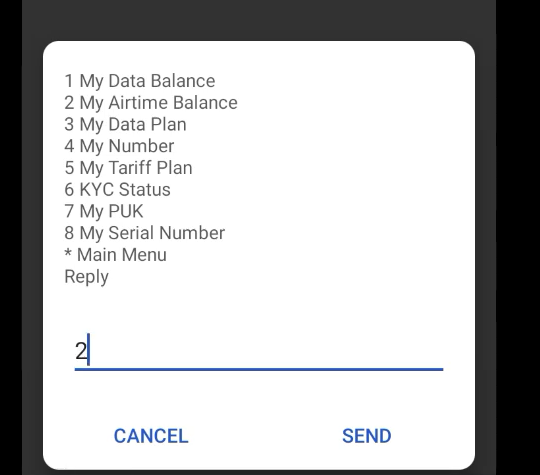
4. Click on "Send" and you'll see your remaining Airtime balance on Airtel.
Note
If you don't want to borrow Airtime & have enough balance, then you can also share it with your friends (if they are also using the same network). Click on the link to know more about it
https://blog.tradecard.store/complete-guide-on-how-to-transfer-airtime-on-airtel-in-nigeria.html
How to Repay Your Borrowed Airtime on Airtel
The repayment process is automatic on the Airtel for borrowing airtime. But how it actually works is mentioned below;
Step 1: You apply for Airtel's Extra Credit service, for instance using a USSD code
Step 2: If you borrow ₦100, Airtel costs ₦15 service fee, so you receive ₦85 airtime.
Step 3: When you recharge next time, Airtel will automatically deduct the full amount you owe.
Step 4: But if you recharge less than what you owe, Airtel will take all the recharge, and the remaining debt will be carried to your next recharge.
Example
1. You borrow ₦100
2. Airtel charges ₦15 (15% service fees)
3. You receive ₦85 airtime (₦100- ₦15)
4. You recharge ₦500 later
5. Airtel deducts ₦115 (₦100+ ₦15 Service Fees)
6. You are left with ₦385
FAQ's
Who is eligible to borrow airtime on Airtel?
1. Airtel users with registered SIM
2. Customers will be evaluated based on how often they recharge each month and their average spending.
3. Users who have paid up all previous loans
What is the code to borrow Airtime on Airtel?
The USSD code to borrow airtime on Airtel is *303# or *500#
What is the code to check remaining Airtime balance on Airtel?
The code to check the remaining Airtime balance on Airtel is *121#.
Can I use my borrowed Airtel airtime balance to browse the internet?
Yes, you can use borrowed Airtel airtime balance to browse the internet.
Can I borrow Airtime balance on Airtel without repaying the previous loan?
No, you need to repay the previous loan first to apply again for borrowing Airtime on Airtel