Have you been searching online for how to transfer Airtime on Airtel? And you come across different terms like Balance transfer, Airtel Me2U service and much more. Don't need to get confused! We understand that when it comes to sharing something with your loved ones, you need a perfect solution. In this blog, we'll walk you through all steps to transfer airtime on Airtel. We will explain in detail about what services Airtel offers and what are their benefits? Let's start!
What is Airtel Me2U service to Share Airtime on Airtel?
Transferring Airtime from Airtel to Airtel is a straightforward process, but only when you have clarity on services that Airtel offers. Being an Airtel user, it is important for you to understand how this service works. Here are some important points to understand;
- Airtel Me2U is for sharing mobile airtime with another Airtel user. There are two main methods that you can use to transfer your credit. One is the USSD code and the other one is through MyAirtelApp. To apply for any of these methods, make sure that your SIM is active. Secondly, you should have enough balance to send Airtime to the recipient.
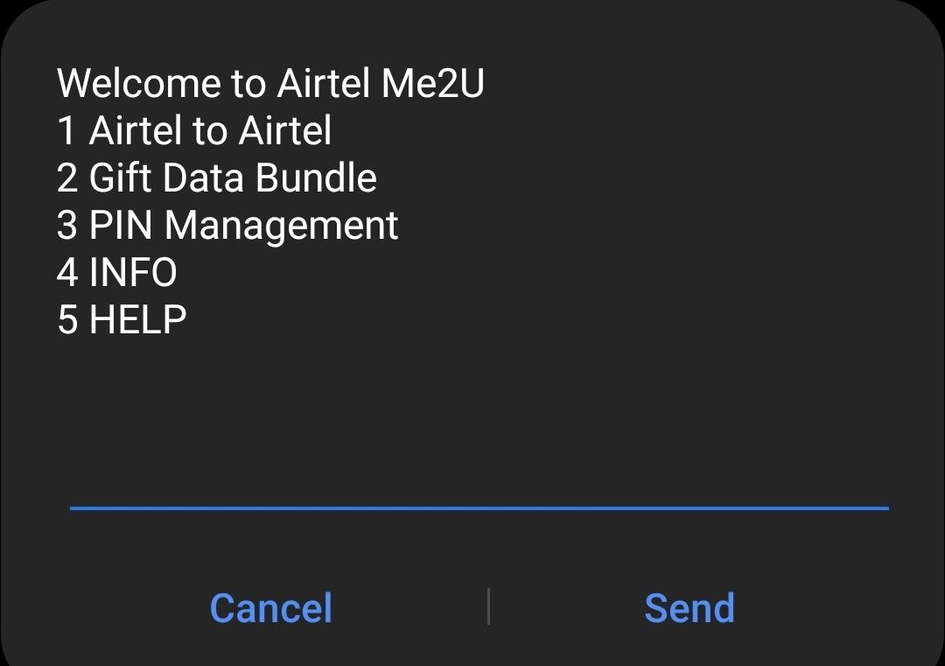
How to Create a PIN to Transfer Airtime on Airtel?
Before you can share your Airtime from Airtel to Airtel using any of the methods that we shared above, you must set up a Transfer PIN. This is the first and most important step because it is mandatory for sending Airtime. It protects your airtime balance from unauthorized use. Here are the steps for the Transfer PIN setup
- On your Airtel line, dial *321#.
2. From the menu, select "PIN Management"
3. Follow the instructions on the screen to create your unique 4-digit PIN.
How to Share Airtime on Airtel?
Via USSD Code
Sharing data from Airtel using code is the traditional and most common method in Nigeria. This method works perfectly when you don't have an app installed on your phone & you have no internet connection. But make sure that you have network coverage because that is important. This method is based on a text-based menu that guides you step by step. Here are those steps;
1. On your Airtel line, dial *321#. This is the code for transferring Airtime to Airtel
2. A menu will appear. Choose "Airtel to Airtel".
3. Enter the receiver’s phone number and the amount of airtime you want to send.
4. Confirm the request. You will receive a message when the airtime transfer is successful
Via MyAirtelApp
If you are looking for an all-in-one platform to check balance, buy data bundles or sending airtime, then MyAirtelApp is the perfect solution. If you want a visual interface, then this app has organized all the menus in and buttons in an attractive way. This method needs an internet connection. Here are the steps;
Download the App
Go to Google Play Store or Apple App Store, download MyAirtel, and open it.
Log In or Sign Up
Use your Airtel number to log in. If you’re new, create an account quickly.
Go to Me2U
On the home screen, tap Quick Actions → View All → Me2U – Share Airtime.
Enter Details
Type the recipient’s Airtel number and the airtime amount you want to send.
Confirm Transfer
Check the details, enter your transfer PIN, and send. You’ll get a confirmation message.
Note: In case you are unable to transfer the Airtime to your friend, you can also buy an Airtime on TradeCard.
Benefits of Transferring Airtime from Airtel to Airtel
No Subscription Needed
To share airtime on Airtel, you don’t need to subscribe or pay any fees. If you have an Airtel line and a Transfer PIN, you can send airtime instantly to any Airtel number.
Flexible Transfer Amount
Me2U lets you send any amount of airtime. There’s no minimum or maximum limit, so you can send small or large amounts depending on recipient's need and your balance.
Unlimited Transactions
You can transfer airtime as many times as you want. This is perfect if you often share airtime with friends or family without worrying about limits.
Fee-Free Service
Airtel does not charge any extra fees to transfer airtime on Airtel. The full airtime amount you send goes directly to the recipient.
Works on Any Airtel Line
You can send airtime to any Airtel number, whether it’s prepaid or postpaid, making it convenient for everyone.
Note: If you don't have enough balance to share airtime, you can also borrow Airtime from Airtel anytime. For more details, click on this link
https://blog.tradecard.store/complete-guide-to-borrow-airtime-on-airtel-for-nigerian-users.html
Mistakes to Avoid While Sharing Airtime on Airtel
Here are some mistakes that you need to avoid while sharing Airtime on Airtel
1. One wrong digit while entering the recipients number can stop the balance transfer. Make sure you double check the number before proceeding.
2. Make sure that you have sufficient balance in your Airtime account, otherwise you cannot share your Airtime with anyone
3. Entering wrong PIN multiple times can also cause error or delay while applying for the service
FAQ's
- How to share Airtime from Airtel to Airtel in Nigeria?
Sharing airtime on airtel is a simple and easy process. You can send it using two methods, which are
1. Via USSD code
2. Via MyAirtelApp
2. What is the code to transfer Airtime to Airtel?
The code to transfer Airtime to Airtel is *321#.
3. Are there any service fees to transfer Airtime to Airtel?
No, sharing Airtime from Airtel to Airtel is free.
4. How many times can I transfer airtime on Airtel in a day, week, or month?
You can transfer airtime as many times as you want. There is no limit.
5. What is the maximum amount I can transfer airtime on Airtel in a day, week, or month?
There is no maximum limit. You can send any amount at any time.