If you're a regular Apple gift card user, you know that keeping track of your balance is essential. Whether it's a new card you haven't redeemed yet or one already linked to your Apple ID, knowing the exact Apple gift card balance helps you plan your purchases smartly. It means you always know how much you can spend on apps, music, movies, or subscriptions.
In this blog, we’ll share simple and quick ways to check your Apple gift card balance, so you can stay on top of your spending and make the most out of your card every time you shop.
Can You Check Your Apple Card Balance Without Redeeming it?
Yes, you absolutely can check your Apple gift card balance without redeeming it. Many people prefer not to redeem their cards right away, especially if they plan to gift them to someone or sell them on a best gift card trading app for cash. In such cases, it’s perfectly reasonable to confirm that the balance is still intact. Fortunately, Apple allows you to verify your gift card balance without linking it to your Apple ID, ensuring your card remains unused and ready for its next purpose.
Steps for Apple Gift Card Balance Check Without Redeeming it
1) Visit the Apple Gift Card Balance Page
Go to the official Apple Gift Card balance check page and sign in using your Apple ID. You can also access it by visiting Apple’s website, navigating to the Gift Cards section, and clicking the “Check Balance” option in the top-right corner.
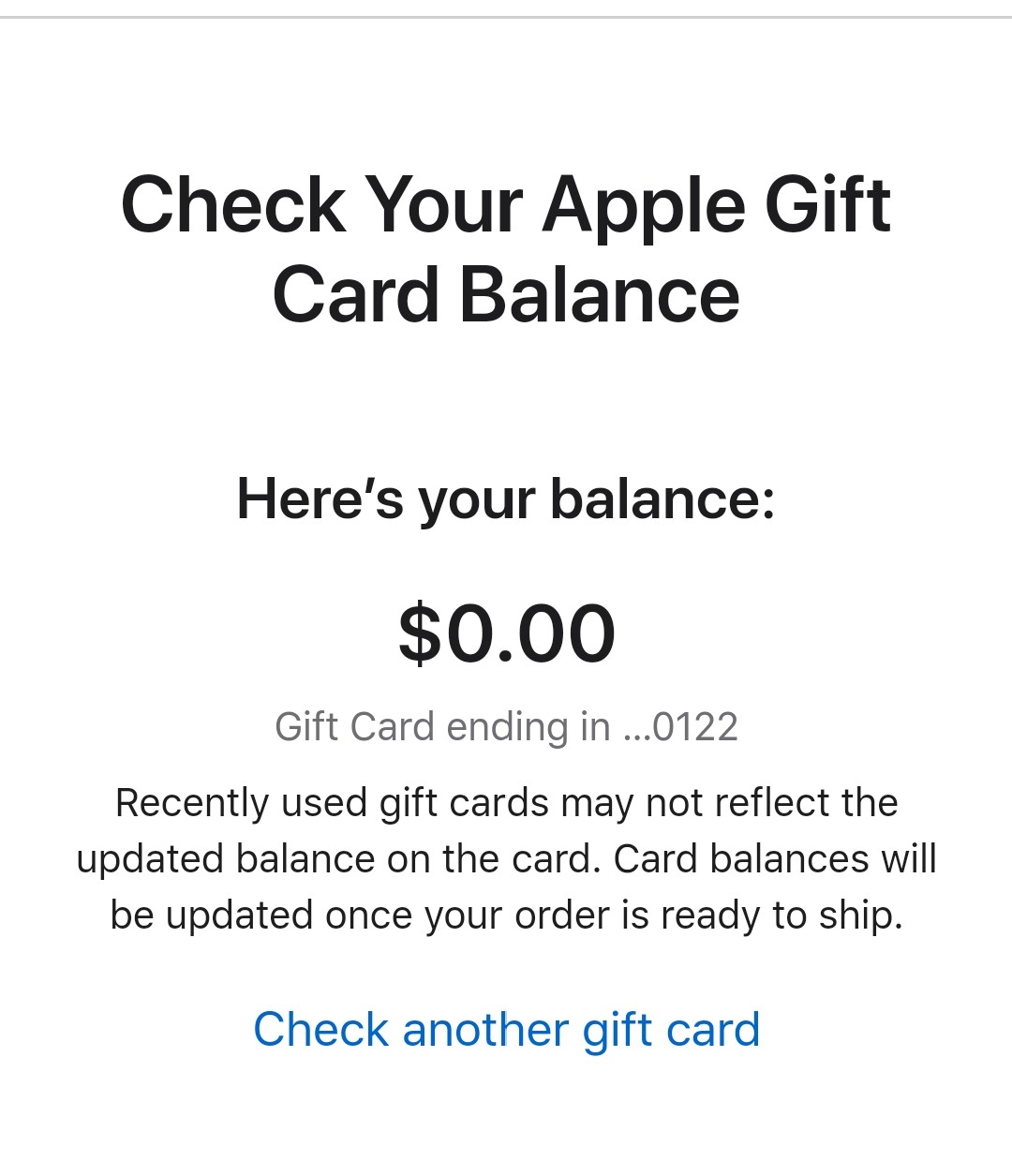
2) Enter Your Apple Gift Card PIN
Once on the page, you’ll be prompted to enter your Apple Gift Card PIN.
For digital cards, the PIN is typically found in the email you received. For physical cards, gently scratch off the silver strip on the back to reveal the PIN.
3) Check Your Balance
After entering the PIN, click the “Check Balance” button. Your remaining Apple Gift Card balance will be displayed instantly on the screen.
Tips When You Are Checking Apple Card Balance Without Redeeming
Use Only the Official Apple Website
Always check your balance through Apple's official site to avoid scams or fake balance checkers.
Keep Your Card Details Secure
Never share your card code or PIN with anyone to avoid Apple card scams. Once someone has your PIN, they can use or redeem the balance.
Check Your Internet Connection
Make sure you’re on a secure and private network before entering your card details.
Verify the Card’s Authenticity:
If you purchased the card from a third-party store or individual, make sure it’s a genuine Apple Gift Card before checking the balance.
Don't Scratch the Card Too Hard
For physical cards, gently scratch the label to reveal the PIN, too much force could damage it.
Take a Screenshot for Record
Once you see your balance, you can take a quick screenshot to keep track of the amount for future use or sale.
How to Redeem Your Apple Gift Card?
Redeeming your Apple Gift Card is very simple and can be done in just a few quick steps on any of the Apple devices including your phone, Mac or iPad. Once you have redeemed the card, the balance will be added to your Apple ID and can be used across the App Store, iTunes, Apple Music, and even for in-app purchases or iCloud storage. Here’s how you can do it:
1. On iPhone, iPad, or iPod Touch, you can open the App Store and tap your profile picture or the sign-in button at the top right.Next, you will select the Redeem Gift Card or Code option. You now have the option to either scan the code using your camera or enter it manually. Tap Done, and your balance will be added to your Apple ID.
2. If you are using a Mac, you can open the App Store on your Mac and click your name or the sign-in button in the sidebar. Choose Redeem Gift Card and Enter your code or use the camera option to scan it.
3. You can also redeem an Apple gift card on your Windows PC. Start by opening iTunes and go to the Account menu. Select Redeem and sign in with your Apple ID. After this enter your gift card code to add the balance. Once the balance is redeemed, it’s available instantly and can be used for any Apple service or product purchase linked to your Apple ID.
How to Check Your Apple Gift Card Balance After You Have Redeemed It?
Once you’ve redeemed your Apple gift card, the balance is transferred to your Apple ID. You can check it anytime to see how much credit you have left. Here’s how:
1. On iPhone, iPad, or iPod Touch
Go to Settings.Tap your name, then Media & Purchases.Tap View Account → sign in if prompted.Your Apple ID balance will be displayed at the top of the screen.
2. On Mac:Open the App Store
Click your name or sign-in button at the bottom of the sidebar.Your Apple ID balance appears just below your name.
3. On Windows PC (via iTunes)
Open iTunes and sign in with your Apple ID.Go to the Store tab and your balance will be displayed below your account name.
FAQs
1. How can I check my Apple Gift Card balance?
You can check your Apple Gift Card balance by visiting the official Apple Gift Card balance page, signing in with your Apple ID, and entering the gift card PIN.
2. Where can I find my Apple Gift Card PIN?
For physical cards, gently scratch off the label on the back to reveal the PIN. For digital cards, the PIN is usually included in the email Apple sent you.
3. How do I check my balance after redeeming my Apple Gift Card?
Once redeemed, your balance is linked to your Apple ID. You can view it from your App Store, Settings, or Apple ID account page.
4. Does my Apple Gift Card balance expire?
No, Apple Gift Card balances do not expire. You can use the remaining balance anytime for apps, music, movies, or subscriptions.
5. Can I use my Apple Gift Card balance to pay for iCloud storage or Apple Music?
Yes. Your Apple ID balance is automatically used for any Apple subscriptions, including iCloud storage, Apple Music, and Apple TV+.
6. Why is my Apple Gift Card balance not showing up?
If your balance doesn’t appear, try signing out and back into your Apple ID. Ensure you redeemed the card correctly and that you’re checking the right Apple ID.
7. Can I transfer my Apple Gift Card balance to another Apple ID?
No, once redeemed, your Apple Gift Card balance is tied to your Apple ID and cannot be transferred to another account.
8. What should I do if my Apple Gift Card balance seems incorrect?
If you believe your balance is wrong, contact Apple Support and provide your gift card code or proof of purchase for assistance.
9. Can I turn my Apple gift card balance to cash?
There is no direct way to transfer your Apple gift card balance into a bank account, however, you can trade your Apple gift card using TradeCard and get Naira in your account.