What Is an Apple Gift Card?
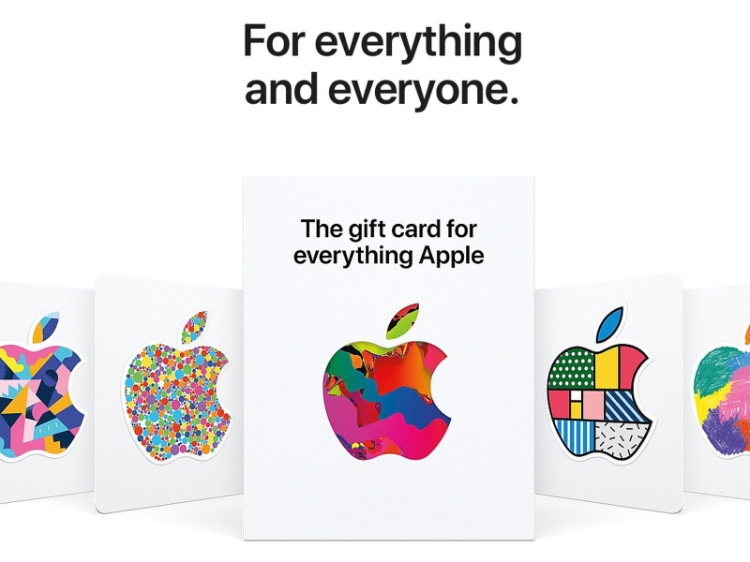
An Apple Gift Card is a prepaid digital or physical card that holds monetary value redeemable within Apple's ecosystem. Launched in 2020, Apple consolidated its separate iTunes and Apple Store cards into one unified Apple Gift Card, simplifying purchases across all Apple services and products.
Unlike single-purpose cards, an Apple Gift Card works across the entire Apple ecosystem including apps, games, music, movies, subscriptions, iCloud storage, and even physical device purchases. Once you redeem it to your Apple ID, the balance follows you across every device signed into that ID: iPhone, iPad, Mac, or Apple Watch.
Do Physical or Digital Apple Gift Cards Pay More?
Apple sells gift cards in two formats, and the difference matters most when you're deciding whether to use the card yourself or sell it later.
| Physical Card | Digital Card (E-Code) | |
| Format | Plastic card with a scratch panel | Code delivered instantly by email |
| Code | 16-digit code hidden under the panel | 16-digit code sent electronically |
| Proof of purchase | Printed receipt | Email confirmation |
| Delivery | In-store pickup or shipping | Instant |
| Gifting | Can be handed over immediately | Can be forwarded anywhere instantly |
| Resale value | Higher — easier to verify, lower fraud risk | Lower — easier to duplicate, higher fraud risk |
Both formats hold identical value at the point of purchase. The difference only shows up when you resell them for Naira on a platform like TradeCard, where physical cards typically pay more because they're easier to verify.
What are the Apple Gift Card Denominations Available?
| Denomination | US Pricing | Typical Uses | Naira Rate (TradeCard) |
| $25 | $25 USD | Games, apps, single subscription | Check current rate |
| $50 | $50 USD | Multiple subscriptions, premium apps | Check current rate |
| $100 | $100 USD | Device accessories, extended subscriptions | Check current rate |
| $300 | $300 USD | Device upgrades, yearly subscriptions | Check current rate |
| $500 | $500 USD | High-value purchases, device bundle | Check current rate |
Apple also allows custom denominations between $15 and $2,000 on its official website, so you can match the card to whatever budget you're working with.
Where Can You Safely Buy Apple Gift Cards in Nigeria?
Where you buy determines whether your card actually works. Ranked from safest to riskiest, these are your legitimate options:
1. Apple's official website. Buying directly from apple.com (or your regional Apple site) is the safest route, so that cards activate instantly, digital codes arrive immediately, physical cards ship straight to your address, and full customer support is available if anything goes wrong.
2. Authorized Apple retail stores. Staff at Apple Stores and major retailers like Walmart, Best Buy, Target, or Selfridges verify card authenticity before the sale and activate cards on the spot, so compromised cards rarely make it onto their shelves.
3. Authorized online retailers. Amazon (official sellers), Best Buy, Target, and Costco all sell genuine Apple cards — just check the seller's rating before you buy.
Places You Should Never Choose To Buy Apple Gift Cards in Nigeria
• Facebook Marketplace or Instagram DMs — Unverified sellers often hand over already-used codes.
• WhatsApp messages from unknown contacts — impersonation is common, and codes are frequently duplicated or already redeemed.
• Unlicensed third-party sites — codes here can be stolen, fraudulent, or region-locked incorrectly.
• Cards priced below 80% of face value — a $100 card selling for ₦25,000 is almost certainly compromised.
What Can You Buy with an Apple Gift Card?
An Apple Gift Card balance can be spent anywhere inside the Apple ecosystem, which covers more ground than most people expect.
1. Apps & Games: Paid App Store downloads, in-app currency (V-Bucks, Gems, Battle Pass upgrades), premium game features, ad removal. Popular titles include Fortnite, Genshin Impact, Call of Duty Mobile, PUBG Mobile, Clash Royale, and Pokémon GO.
2. Music, movies & entertainment: Individual song purchases on Apple Music, movie purchases or rentals and TV episodes on the iTunes Store, plus audiobooks and ebooks through Apple Books.
3. Subscriptions: Apple Music, Apple TV+, Apple Arcade (100+ premium games), Apple News+, iCloud+ storage, and AppleCare+ device protection.
4. Hardware & accessories: Compatible accessories like cases, chargers, and AirPods, and in some regions, eligible Apple devices themselves.
5. In-app purchases: Any app supporting in-app purchases accepts your balance — think game cosmetics, streaming subscriptions, premium features in education apps, and fitness app memberships.
How To Redeem an Apple Gift Card to Your Apple ID?
Redemption works the same way across iPhone, iPad, and Mac.
1. Reveal your 16-digit code. Scratch the back panel gently for a physical card or check your email inbox for an e-code.
2. Open the App Store on your device (or the Mac App Store on a Mac).
3. Access your account. Tap your profile icon in the top right corner, select Account, then choose Redeem Gift Card or Code.
4. Enter your code. Let your camera scan it automatically, or type the 16 digits in manually.
5. Confirm redemption. Tap Redeem — your balance lands on your Apple ID instantly.
6. Verify the balance. Head back to your Account section to confirm it now appears under "Apple Gift Card." Your funds are ready to use immediately.
How Do You Check Your Apple Gift Card Balance?
You can check your balance straight from the App Store, through Apple's website, or by simply asking Siri — each method takes under a minute and works whether you're on an Apple device or just checking from a browser.
Always confirm your balance before selling, since a card with only a partial amount left is likely to fail verification during upload. See our full guide on how to check your Apple gift card balance for the exact steps for each method, including which option works best if you don't have an Apple device on hand.
Do Apple Gift Cards Expire?
No — an Apple Gift Card never expires. Once purchased or redeemed, the balance carries no expiration date, so you can use it now or hold it indefinitely without losing value.
That said, holding onto a card you intend to sell isn't risk-free. Exchange rates fluctuate daily, so a $100 card held in the hope of a better rate could just as easily lose value if the Naira strengthens instead. An unredeemed balance also sits exposed to account compromise or theft the longer it's held, and if your Apple ID ever gets locked or flagged, that balance becomes temporarily inaccessible. If you already know you're selling, trade it while the current rate is fair rather than waiting on a marginal improvement.
Can You Transfer Apple Gift Card Balance Between Accounts?
No. Once a code is redeemed to an Apple ID, the balance is locked to that account permanently. You can't move it to a family member's Apple ID, send it to a friend, merge it with another balance, or use it on a second account, even if that account is on the same device.
If your real goal is converting the card to cash rather than using it on Apple's platform, skip redemption entirely:
1. Leave the physical card or e-code unredeemed.
2. Sell the card for cash on TradeCard with the full balance intact.
3. Receive Naira instantly in your wallet.
4. Withdraw to your Nigerian bank account.
This route keeps the card's full monetary value, rather than losing it to Apple ID account restrictions.
How Do You Protect Your Apple Gift Card from Scams and Fraud?
Apple Gift Cards attract scammers precisely because they hold spendable value and redeem easily. Good practice looks different depending on where you are in the card's life:
Before Redemption:
• Keep codes confidential — Don't share your 16-digit code with anyone until you're ready to redeem it
• Photograph codes safely — If you photograph a code for reference, delete the photo after use
• Store physical cards securely — Keep scratch panels covered until redemption
• Use private email for delivery — E-codes sent to email can be intercepted if your email is compromised
After Redemption:
• Enable two-factor authentication — Protect your Apple ID with 2FA to prevent unauthorized purchases
• Set spending limits — For child accounts, enable parental controls and purchase restrictions
• Monitor your account — Regularly review purchase history for unauthorized transactions
• Use strong passwords — Create a unique, complex password for your Apple ID
• Learn more about avoiding apple gift card scams and protecting yourself from fraud.
How Do You Redeem an Apple Gift Card for Cash in Nigeria?
If you hold an Apple Gift Card but don't use Apple services, converting it to Naira on TradeCard takes a few minutes.
1. Download TradeCard — from the Google Play Store or App Store — and create an account with your phone number and email.
2. Tap "Sell Gift Card" from the home screen.
3. Select "Apple Gift Card."
4. Enter your card details — denomination ($25, $50, $100, $300, or $500), card type (Physical or E-Code), and region (US, UK, Canada, etc.).
5. Upload or enter your code. For a physical card, photograph the scratch panel showing the 16-digit code and PIN clearly. For an e-code, copy it straight from your email and paste it into the app.
6. Let TradeCard verify the card. This typically takes 2–5 minutes for high-value cards, checking authenticity, full balance, region accuracy, and prior redemption status.
7. Review your payout. TradeCard shows the exact Naira amount — check the current $100 Apple Gift Card rate to Naira for a live example.
8. Confirm and receive payment. Your Naira lands in your TradeCard wallet instantly, ready to withdraw to your Nigerian bank account within hours.
FAQs
1. Can I use an Apple Gift Card on multiple devices?
Yes. Once redeemed to your Apple ID, the balance is accessible on any device signed into that same ID — iPhone, iPad, Mac, or Apple Watch.
2. Can I check my Apple Gift Card balance before redeeming it?
No. You need to redeem the code to your Apple ID first; after that, you can check the balance anytime in your account settings.
3. Are there regional restrictions on using Apple Gift Cards?
Yes. A US Apple Gift Card only spends on a US Apple ID, even if you're physically in another country. Your Apple ID region must match your card's region.
4. What's the difference between an Apple Gift Card and an iTunes Card?
iTunes Cards were the pre-2020 product. Apple has since combined iTunes and Apple Store cards into one unified Apple Gift Card. Older iTunes Cards still redeem the same way.
5. Why do physical Apple cards pay more than e-codes when selling on TradeCard?
Physical cards carry a tangible card and receipt as proof, which lowers fraud risk. E-codes are easier to duplicate or compromise with, and TradeCard's rates, typically 5–10% lower for e-codes, reflect that difference.
Conclusion
An Apple Gift Card is a versatile, secure asset in Nigeria's digital economy, whether you're using it across Apple's ecosystem or converting it straight to Naira. It works on apps, games, subscriptions, and devices alike, holds no expiration date, and its resale value depends heavily on format and region — so buying only from Apple's official channels or authorized retailers, and checking your balance before selling, protects both your money and your options.
If you're holding an Apple Gift Card you don't plan to use, don't let it sit idle. Selling it on TradeCard takes about two minutes and gets you cash within hours.
Download TradeCard today and convert your Apple Gift Card to Naira with instant verification and zero hidden fees. New users receive a ₦2,300 welcome bonus on their first trade.