Amazon gift cards are among the most widely used gift cards worldwide. You can use that card for multiple purposes, like shopping & gifting it to your friends. But if you no longer need that card and thinking about "How can I transfer Amazon gift card balance to bank account"? Then let us give you the straight answer that directly transferring Amazon gift card balance to bank account is not possible. But it is possible by using different methods. In this blog, we'll go through methods to transfer Amazon card balance and also how you can convert your Amazon gift card into cash. Let us start!
Why I Cannot Directly Transfer Amazon Gift Card Balance to Bank Account?
Here are some reasons why you cannot transfer your Amazon card balance directly to your bank account;
Amazon's Policy
No portion of Amazon gift card balance can be transferred to any bank account directly. These gift cards cannot be reloaded, resold or used as a payment outside of the Amazon system. These cards are designed for Amazon purchases and bound by strict terms against transferring funds outside the platform directly.
No Cash Value
Amazon gift cards have no cash value in terms of redeeming them outside the Amazon system. They have been designed as store credit. Amazon does not allow you to change them into cash or send them to your bank directly.
Security & Fraud Prevention
If Amazon allowed gift cards to be transferred directly into cash or bank accounts, it could be misused by scammers. To protect customers and keep transactions safe, Amazon avoids direct cash transfers and limits gift cards to shopping on its platform.
Different Ways to Transfer Amazon Gift Card Balance to Bank Account
In the previous section, you've read that there is no official way to transfer the Amazon card balance into cash or into a bank account. But don't get upset. There are some smart ways through which it can be done easily. Here are thee two ways;
- Transferring it via Amazon Pay
2. Transfer it using a Gift card trading platform
3. In the end, we will also reveal which method is quicker and takes less time. Lets start!
Transfer Amazon Card Balance Using Amazon Pay
Here are the steps that you can follow;
💳 Step 1
Go to Amazon website https://pay.amazon.com/
💳 Step 2
In this step, click on the Sign in button on the top right corner. Enter your email or mobile number to sign in.
💳 Step 3
After signing in, you will find an option "Your Account" under your profile section. Scroll down and click on that option.
💳 Step 4
Find the option "Gift Cards" and click on it.
💳 Step 5
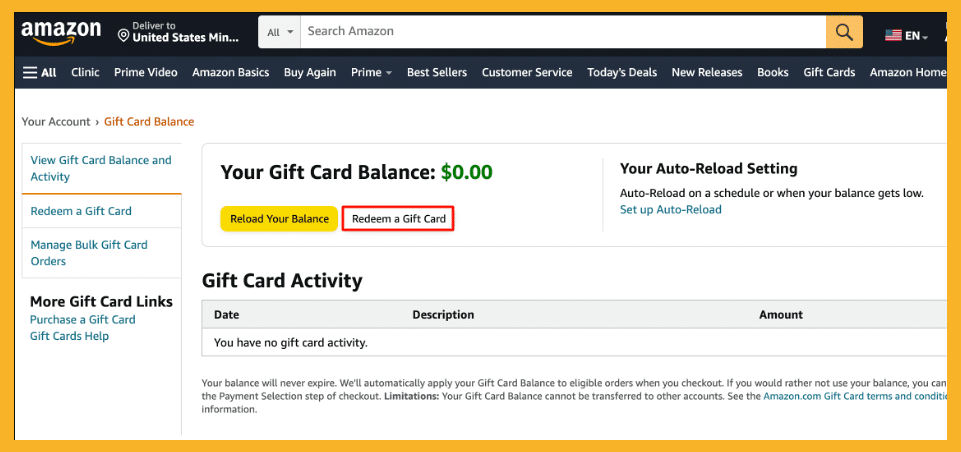
On the next page, you can see two options under your gift card balance. One is "Reload Your Account" and the other one is "Redeem Your gift card".
💳 Step 6
Enter your 16-digit gift card code and proceed further.
💳 Step 7
Now, from the same "Your Account" page, look for the option "Your Payment". On that page, click on "Send Money". Enter your bank account details & click on Send. Your balance will be sent to your bank account using Amazon Pay instantly.
Important Things to Remember Before Transferring Balance Using Amazon Pay
Here are some points that you can keep in mind;
Bank Account Must be Linked
Make sure that your bank account is linked with Amazon pay and its verified as the incorrect details can cause failed transfers.
Transfer Pay Limits
Amazon Pay sets limits on how much money you can transfer per transaction, per day, or per month. Make sure your transfer amount follows these limits.
Policy May Change
Amazon Pay’s rules can change anytime, so make sure to check the latest guidelines in the Amazon Pay section before you proceed.
Use the Official Amazon Pay Page Only
Always access Amazon Pay directly through the official site or app to avoid fraud or scams.
Convert Amazon Gift Card into Cash Using TradeCard
Let us reveal first that the fastest way to transfer Amazon gift card balance to a bank account is using TradeCard. TradeCard is a gift card trading platform where you can sell your gift cards instantly for cash.
Here are the steps to convert Amazon gift cards into cash on TradeCard
📌 Download the TradeCard app and sign in using a valid email address. If you have never used the app before, then you can register yourself first.
📌 On the dashboard, you'll find a section of "Gift Cards" where you will select "Amazon"
📌 On the Sell gift card page, you need to enter all gift card details. For instance, if you got an Amazon gift card of $50, then you have to select the USD as currency and 50 as denomination.
📌 Then you need to enter your gift card code. Right after this step, you will be able to see the live gift card rate
📌 Upload the image of your Amazon gift card. Make sure that you upload a clear and readable image
📌 Click on "Start Trade" and you'll get the amount in your TradeCard account right away. If your TradeCard account is already linked with the Nigerian bank account, then you can easily transfer the amount.
Benefits of Using This Method Over Transferring Amazon Card Balance Using Amazon Pay
As we have mentioned , the fastest method is using TradeCard to transfer Amazon card balance to the bank. Therefore, we are listing some of the benefits if we compare it with the Amazon pay method.
📌 No Extra Steps
On Amazon pay, you have to switch to multiple tabs and pages to transfer your balance. But on TradeCard, all you have to do is enter gift card details from one page only.
📌 Control Over Price
Amazon Pay Tranfers do not allow any flexibility. You get the standard value of your gift card. But on TradeCard or other gift card trading platforms, you may get a higher rate. You can even increase your amount using reward features on TradeCard.
📌 KYC and Verification Requirements
Amazon Pay requires completing KYC verification to send money to a bank, which may take some time for new users. On gift card trading apps, you don't have to go through these steps to transfer your money to the bank.
📌 Risk of Account Restrictions
Using Amazon Pay repeatedly for converting gift cards to cash may trigger account review or suspend your account. While selling Amazon gift cards for cash on TradeCard won't suspend your account and there is no risk or any restriction.
📌 Fast Customer Support
Customer support on Amazon pay takes 2 business days to respond. But on TradeCard, you'll get the response within minutes. So, if you are in a hurry and need to transfer your Amazon gift card balance to your bank account, then TradeCard is your go-to option.
FAQ's
1. Is it possible that I can transfer my Amazon gift card balance to my bank account directly?
No, it is not possible to transfer Amazon gift card balance to bank account directly.
2. How can I convert my Amazon gift card into cash?
You can convert your Amazon gift card into cash using trusted gift card trading platforms like Cardgoal
3. How long does it take to receive the payment in bank from TradeCard account?
If your bank account is already linked with the TradeCard account, then it will take few minutes to get the payment.