If you have enough balance in your Airtel account, and your friend has suddenly asked you to share it. The first question that comes to your mind is "How to share data on Airtel?" The common way to transfer data on Airtel in Nigeria is using a code which is *321#. If you have been searching for the detailed steps, then you have come to the right place. In this blog, we'll walk you through the eligibility requirements, and everything you need to know about how to transfer data from Airtel to Airtel in detail.
Eligibility Requirements to Transfer Data on Airtel
Here are some eligibility requirements for Nigerian users to transfer data on Airtel.
Active Airtel Number
The user with an active Airtel number can share the data from its existing data with the other user. If your line is suspended, inactive or has insufficient balance, then you cannot share your credit with anyone else.
Valid Data Bundle
Your data bundle should be valid, only then can you transfer data to another Airtel number. Make sure that your data bundle is not expired.
You'll Need a Transaction PIN
To share data, you'll need a transaction PIN. There is a default PIN but changing it later is recommended for security purposes.
Recipient's Network
The recipient of the shared Airtel data must also be an active Airtel user. The data can be shared only from Airtel to Airtel (should have the same network). It won't work for other networks like MTN or Glo etc.
Sufficient Airtime Balance
If you are trying to transfer data from Airtel to Airtel, then you must have sufficient Airtime balance in your account. Make sure you always check your Airtel data balance . Otherwise, you are not eligible to share data from your credit.
Steps to Set Up a Transfer PIN to Transfer Data on Airtel
Before you can share data on Airtel, you need a Transfer PIN. This PIN helps keep your data and balance safe. Follow these simple steps to set it up or change it:
1. Airtel provides a default Transfer PIN, which is 1234
2. For better security, it is strongly advised to change this PIN to avoid unauthorized use.
3. To change your PIN, dial *321# on your Airtel line
4. Select the "PIN Management" option from the menu
5. Follow the on-screen instructions to create a new PIN.
Quick & Easy Ways to Share Data on Airtel
Using USSD Code
Airtel offers a Smart SHARE service that allows you to share data plans with your loved ones. It can be done easily by using an Airtel transfer code. But there are two ways to share Airtel data!
1. Data Sharing
2. Data Gifting
The steps for these services are mentioned below;
For Data Me2U (Data Transfer)
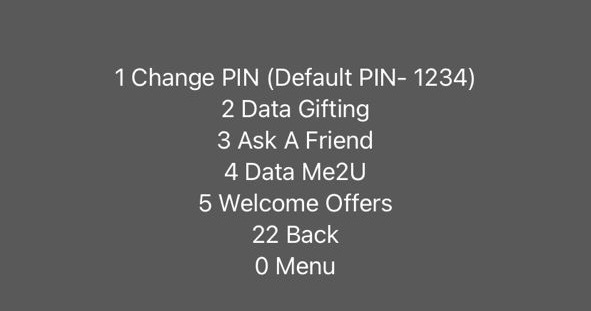
Data Me2U allows you to share data from your existing data balance with another Airtel user. The code to share data on Airtel is *321#. Here are the steps that you need to follow;
1. On your Airtel line, dial *321#
2. From the displayed menu, select "Gifting & Sharing" .
3. In the next step, look for the option "Data MeU2, and select it
4. Click on the option "Send from Existing Data Balance"
5. In this step, you need to enter the number of the recipient. Make sure that you enter the correct number.
6. After this step, enter the Transfer PIN and the data will be shared with the recipient. The confirmation message will be sent to you and the recipient phone at the same time.
Note:
If you don't have enough data even for your own use, you can borrow the from the Airtel too, click on the following link to know how can you borrow data from Airtel
https://blog.tradecard.store/quick-guide-on-how-to-borrow-data-from-airtel.html
Data Gifting (Buying a New Data Bundle)
Data Gifting allows you to buy a new data plan for another user by paying with your own balance.
1. The code for data gifting is the same as the Airtel transfer code which is *321#
2. From the menu, select "Gifting and Sharing", then continue with the option "Data Gifting".
3. From the shown Airtel data bundles, select one that you want to gift someone. Enter the recipient's number.
4. Complete the process by entering your Transaction PIN and get a confirmation message within seconds!
Note: In case the Airtel website is not working and you want to buy data for your loved ones immediately. You can do it on TradeCard too. If you have an unused gift card, sell it for cash immediately and you'll be able to buy a new data bundle for your loved ones!
Common Issues While Transferring Data on Airtel
Here are some common issues that you might face while sharing data from Airtel to Airtel;
Entering Incorrect Recipient Number
You may find an issue while transferring data to Airtel if you have entered the wrong number. Make sure you double check the number before applying for the service.
Difference in Recipient's Network
Data sharing is only possible when both parties are from the same network. If the recipient is from another network, then this service won't work.
Insufficient Balance
Whether you are transferring the data or gifting it to someone, you need a sufficient balance. If you are low on balance, you cannot share your data on Airtel.
Daily or Transfer Limits Reached
Airtel places limits on how much data you can share. You may only be able to send 200MB to one person at a time. But you can share 200MB each with 2 recipients daily. If you exceed these limits, the transfer will fail.
Sometimes, Airtel may be experiencing temporary network problems. This can cause the transfer to fail. Wait for about 10 minutes and try again. If you still face the same issue, you can contact the Airtel customer care team 24/7
FAQ's
What is the code for sharing data on Airtel?
The code for sharing data on Airtel is *323#.
How to Transfer Data on Airtel?
You can transfer data on Airtel using the code *323#.
How much data on Airtel can be shared at a time?
A maximum of 200MB data can be shared with one person at a time.
Is data sharing on Airtel available for both Pre paid and Post-paid users?
Yes, it is available for both prepaid and post-paid users.
Will a recipient pay for the shared or gifted card on Airtel?
No, they don't have to pay for the shared or gifted data on Airtel. The sender has already paid for it.
How many people can I share data on Airtel with?
You can share data with a maximum of 2 recipients daily.
What is difference between data sharing & data gifting on Airtel?
In data sharing, you transfer data to another Airtel user from the existing balance you have. On the other hand, in data gifting, you buy a new data bundle for your loved ones. However, the code for data sharing & data gifting is the same (*321#). But the steps after dialing the code are different in both cases.