If you have been searching for "How to Borrow data from Airtel"? Then the most common method is using the code which is *500#. This service is the perfect solution when you run out of your data. You can also use some other methods to borrow data on Airtel, which we are going to explain in this blog. In the same blog, we will also cover the eligibility criteria for borrowing data from Airtel. So, whichever method you choose, you can get your data instantly without any delays. Let's start!
Who Can Borrow Data on Airtel? Eligibility Requirements
Not all Airtel users can have access to the Airtel Credit Loan Service, even if you know all the steps to borrowing data from Airtel. If you are not meeting the criteria, you won't be able to access this service. If you want to avail the service without any issues, then you must meet the following eligibility criteria.
Active SIM Registration
Your Airtel line must be registered with NIN (National Identification Number) and active. This is an important criteria by Nigerian law to ensure all mobile users are verified. If you are unregistered or using an inactive SIM, then you cannot avail this service.
Minimum Usage Requirement
Your Airtel number must have been active for at least three months. New SIM cards are not immediately eligible for Credit Loan Service. Only users who have been on the network for some time and have a usage history can borrow data from Airtel.
Consistent Recharge Record
Another important criteria to borrow data from Airtel is that you need to top up your account consistently (at least ₦200 per month). This shows that you are an active user. If you never or rarely recharges your Airtel line, then the chances are higher that your borrowing data request may be denied.
No Outstanding Loans
1. If you had a loan in the past and didn't pay yet, then you cannot get this service. You need to repay your previous loan first to avail this service.
2. Meeting all these requirements will let you borrow the data and your request will be processed immediately.
2 Ways to Borrow Data From Airtel
📞 Via USSD Code
How to Do It?
Follow these simple steps to borrow data from Airtel using the USSD Code;
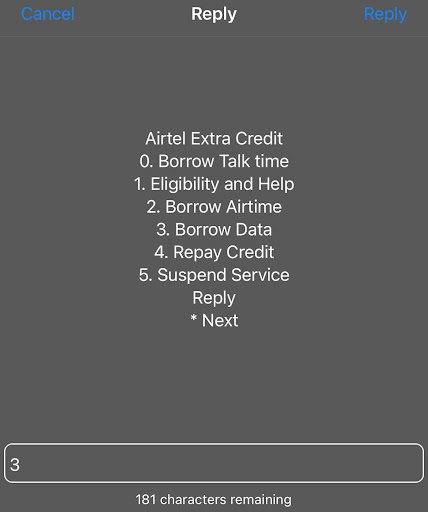
Step 1: Open the Dialer on your phone. Make sure that you are using the Airtel line. Dial the code to borrow data from Airtel which is *500#.
Step 2: You will see a menu appear on your screen. From the options displayed, select "Borrow Data". Then, Airtel shows a list of bundles from where you need to select your data bundle that best suits your needs.
Step 3: Confirm the selection and follow the on-screen prompts. You will get the confirmation message within minutes.
Note:
If are unable to borrow data from Airtel due to any network issue, you can also buy data on TradeCard too using the "Pay Bills" feature.
Benefits of Using The USSD Code to Borrow Airtel Data
No Internet is Needed
You don't need any internet or mobile data when you are using this method.
Work on All Phones
If you are thinking that you need a smartphone for that. Nope! You can apply for that service on all types of phone, whether it is basic or Smart phone.
Fast & Instant Method
The process only takes a few seconds to complete. You don't have to wait for hours to complete this method. Just after confirming your amount, the borrowed data will be added to your Airtel account.
Easy to Use Method
You don't have to scroll through multiple options and tabs to apply for the loan service. The menu is simple and easy to understand, even for the first time users.
Available Anytime
You can avail this service anytime, whether it's day or night. You can borrow data using this method 24/7. In case you are facing any issue, you can contact the Airtel support team.
📱Borrow Airtel Data Via MyAirtelApp
To use this method, you need to download the MyAirtelApp first from the App Store or Google Play Store. After downloading, register yourself on the app. On the dashboard, scroll down and find the section "Borrow Airtel". When you click on that, you will be directed to the page "Loan Providers". Select the CLS (Credit Loan Service option. On the CLS page, select "Borrow Data", pick your amount and confirm your selection. Your Airtel account will be credited with this method immediately.
Benefits of Using MyAirtelApp to Borrow Data on Airtel
If you are a person who can't remember codes or want a more visual way to apply for this service, then using MyAirtelApp is your go-to option. Let's see some of the benefits of using this method!
User Friendly Interface
If you are using this app for the first time, you won't get confused because this app has a clear layout. Within just a few taps, you'll be able to access the service.
All Services in One Place
Using this app, you can avail multiple services. With the Airtel app, you can borrow data, borrow airtime, track data usage, check your balance and much more.
Better Account Control
Once you avail the service, you can easily manage and monitor your borrowed data from the app.
Convenient for Smart Phone Users
If you are an Android or iPhone user, then this method would be ideal for you. This is a modern method and best for those who prefer app-based services over dialing codes.
Things to Remember Before Borrowing Data From Airtel
Knowing codes and steps to borrow data from Airtel is not enough. There are some important things that you should remember too. But what are these? Let's have a look at them;
Service Fees
This service doesn't come free, you have to pay for it. Airtel charges a 15% service fee. For example, ₦100 data bundle, Airtel will deduct ₦115 when you next recharge.
Repayment Process
The repayment process is automatic. Once you recharge your account, the borrowed amount + service fee will be deducted immediately from your balance.
Validity Period for Borrowed Data
The borrowed data on Airtel comes with a certain validity period. Make sure that you check your remaining borrowed data before it expires. For example, one of the Airtel data packages with 200 MB ideal for using social media. This bundle comes with a validity of the 3 days only. If your data expires, you won't be able to use it. So, manage it accordingly.
How to Check Borrowed Data Balance on Airtel
As mentioned above , borrowed data comes with a validity period. So, you need to check your balance on a regular basis and use it wisely. But how to check this;
1. One way is through the USSD code which is *323#. By dialing that code on the Airtel line and following on-screen instructions, you can check your balance.
Note: The same code can be used to check main Airtel Data balance as well.
2. The second method is checking balance through MyAirtelApp, which is very easy. All you need to do is to open and login to your app. On the dashboard, you'll see the data balance section where you can see your remaining borrowed amount.
FAQ's
1. What is the code to borrow data from Airtel?
The code to borrow data from Airtel is *500#
2. How to borrow data from Airtel in Nigeria?
There are two methods that you can use to borrow data from Airtel in Nigeria.
1. Through USSD Code
2. Through MyAirtelApp
3. What is the code to check borrowed data balance on Airtel?
The code to check borrowed data balance on Airtel is *323#.
4. What is the Airtel Credit Loan Service?
Through Airtel Credit Loan service, the eligible users can borrow the data from Airtel using their credit balance. They need to pay back upon the next recharge and repayment process is automatic (with a service feed of 15%)
5. Is there a service charge to borrow data from Airtel?
Yes, there is a service charge of 15% to borrow data from Airtel?
6. How many times can I borrow data from Airtel?
You can borrow data multiple times, as long as you stay within your assigned credit limit.
7. Is there any way that I can share my Airtel data with my friends too?
Yes, you can also share your Airtel data with your friends & family members using multiple methods; please click on the link below;
https://blog.tradecard.store/complete-guide-to-share-data-on-airtel-in-nigeria.html