Apple gift cards are widely used for buying apps, subscriptions, games, and other digital content from Apple services. Many people receive them as gifts, rewards, or online payments. However, not everyone is sure how to redeem Apple gift card codes or where the balance can actually be used.
The good news is that redeeming an Apple gift card is simple once you know the steps. After redemption, the value of the card is added to your Apple ID and can be used for purchases across Apple services. Knowing the right steps ensures you don’t face unnecessary errors and can start using your balance without delays.
If you also plan to trade gift cards in Nigeria, platforms like TradeCard make it easy to convert unused gift cards into cash safely, adding flexibility to how you manage your balances.
Let’s take a closer look at how you can redeem Apple gift card on different devices, so you can get the most out of your balance quickly and safely.
If you want to read more about Apple gift cards, click here and combine more knowledge easily.
How to Redeem Apple Gift Cards on Different Devices?
Redeeming an Apple gift card is straightforward, but the process varies depending on whether you’re on an iPhone, iPad, Mac, or Windows computer. Below are the most common methods for redeeming your gift card.
1. Redeeming an Apple Gift Card on iPhone or iPad
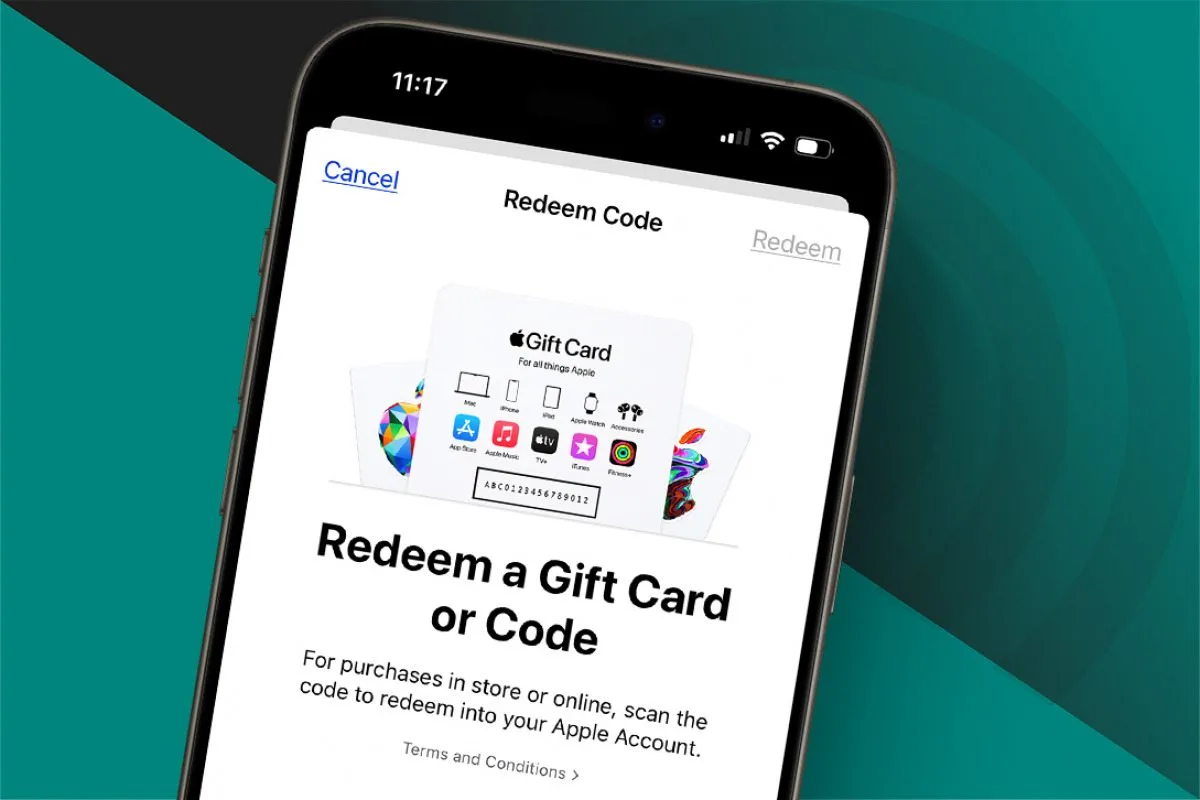
If you’re using an iPhone or iPad for redeeeming Apple gift card, the App Store provides the quickest method. Follow these steps:
1. Open the App Store on your device.
2. Tap your profile icon at the top-right corner.
3. Select “Redeem Gift Card or Code.”
4. Choose one of the following:
• Scan the code using your camera
• Enter the code manually
5. Tap 'Redeem' to add the balance to your Apple ID.
After successfully redeeming, your Apple ID balance will be available for purchases across all Apple services, including apps, games, music, subscriptions, and more.
2. Redeeming an Apple Gift Card on Windows (via iTunes)
If you are using a Windows PC, you can redeem your Apple Gift Card through iTunes by following these steps:
1. Open iTunes on your computer. Ensure it is updated to the latest version.
2. Click “Account” in the menu bar at the top of the iTunes window.
3. Select “Redeem.”
4. Sign in with your Apple ID when prompted.
5. Enter the gift card code exactly as it appears and confirm.
Once the code is successfully redeemed, your Apple ID balance is updated and ready for use across Apple services, just like it would be on a Mac or iOS device.
Common Issues While Redeeming Apple Gift Cards
Even when you have a valid Apple Gift Card, you may encounter problems during redemption. Understanding these common issues can help you resolve them quickly and access your balance without unnecessary delays. Let's have a look at what are the common problems people face during redemption of Apple gift cards.
Incorrect Code
Entering the code incorrectly is one of the most frequent issues. Each Apple Gift Card code is case-sensitive and includes both letters and numbers. Double-check that every character is typed exactly as it appears on the card or screen. Even a single typo can prevent successful redemption.
Region Restrictions
Apple Gift Cards are region-specific. A card purchased in the United States, for example, may not work with an Apple ID registered in Nigeria or another country. Always ensure your Apple ID region matches the region of the gift card to avoid errors.
Already Redeemed
If the gift card has been used before, it cannot be redeemed again. This can happen if the card was given to someone else or purchased from an unofficial seller. Before trying to redeem a second time, confirm the card’s balance and usage history.
Damaged or Unreadable Code
Physical gift cards can get scratched or damaged, making the code difficult to read. In these cases, Apple may require additional verification, such as proof of purchase, before allowing redemption. Handle physical cards carefully and keep receipts in case verification is needed.
Account Verification Issues
For security purposes, Apple may require verification before allowing a gift card to be redeemed. This can include signing in to your Apple ID, verifying your email, or confirming payment information. Make sure your account details are up to date and fully verified.
Expired or Invalid Cards
Some gift cards have expiration dates or may be invalid if purchased from unofficial sources. Always check the card’s validity before attempting redemption to avoid unnecessary errors.
Early understanding of these issues will help you be more careful through the process. If redemption fails, the next step is knowing the correct troubleshooting actions to resolve the problem efficiently.
What to Do if Your Apple Gift Card Redemption Fails?
If your Apple Gift Card doesn't redeem as expected, don't panic. Follow these steps to troubleshoot the issue and access your balance:
1. Verify the Code
Check every character carefully. Gift card codes are case-sensitive and include both letters and numbers. Even a small typo can prevent successful redemption.
2. Check Your Apple ID Region
Ensure that your Apple ID is registered in the same region as the gift card. Region mismatches are a common reason for failed redemptions.
3. Restart the App Store or Device
Sometimes, simple glitches can prevent redemption. Close the App Store and reopen it, or restart your iPhone, iPad, or computer before trying again.
4. Sign Out and Sign Back In
Signing out of your Apple ID and then signing back in can refresh your account settings and resolve temporary issues.
5. Contact Apple Support
If the above steps don’t work, reach out to Apple Support with your gift card code or proof of purchase. They can verify the card and help you redeem it safely.
If you don't plan to redeem the card immediately, you can convert it to cash using platforms like TradeCard, which is the best app to sell gift cards in Nigeria. This allows you to use the value without waiting for redemption issues to be resolved.
Where You Can Use an Apple Gift Card After Redemption?
Once you redeem Apple Gift Card, the funds are added directly to your Apple ID, giving you flexibility in how you spend them. Your balance isn't limited to a single device or service, it works across all Apple assets and accessories. Here's where you can use it:
• App Store – purchase apps, games, or in-app content.
• Apple Music – pay for subscriptions.
• Apple TV+ – buy or rent movies and TV shows.
• Apple Arcade – access premium games.
• Apple Books – purchase ebooks or audiobooks.
• iCloud Storage – upgrade your storage plan.
• In-app purchases – for apps and games you already use.
Because the balance is linked to your Apple ID, it is available on any Apple device you sign into. If you don’t plan to use it immediately, gift card trading platforms let you convert unused gift cards into cash quickly and securely.
Expert tips for maximizing the value of Apple gift cards after Redeeming
Knowing how to use your Apple gift card after redeeming, can help you get the most value. The following strategies show practical ways to manage your gift card balance effectively.
Subscriptions
Services like Apple Music or Apple TV+ can be paid directly with your gift card balance, helping you cover recurring costs without touching your cash.
Combining multiple gift cards
If you have more than one card, add all of them to the same Apple ID to consolidate balances and simplify spending.
Bundle purchases during sales
Wait for seasonal promotions like Black Friday or New Year sales. Combining your gift card balance with discounts allows you to acquire high-value apps, games, or media at minimal out-of-pocket cost.
Upgrade iCloud storage temporarily
Need extra backup space for a photo dump or device migration? Use your balance to upgrade to 200GB or 2TB for a few months, then revert. This avoids long-term charges on your credit card.
How to Redeem Apple Gift Card for Cash in Nigeria?
Not everyone wants to spend their Apple gift card immediately on apps or subscriptions. If you’re in Nigeria and want to convert your Apple gift card into cash, the process is simple with a trusted platform like TradeCard.
Here's how it works:
1. Download and install the app
2. Sign up and create an account.
3. Select the type of gift card – Choose Apple gift card from the list of supported cards.
4. Enter your gift card details – Input the card code and the value.
5. View the current rate – TradeCard will show you the current exchange rate for your card in Naira.
6. Confirm and receive payment – Once confirmed, the cash is transferred directly to your Nigerian bank account.
Using TradeCard, you can trade your Apple gift card safely and instantly. TradeCard is the best app to sell gift cards in Nigeria, trusted by thousands of users for fast payouts and secure transactions.
Conclusion
Apple gift cards are a versatile and convenient way to access apps, games, subscriptions, and other Apple services. Redeeming them correctly ensures you can use the balance safely and efficiently, while managing them wisely helps prevent common issues.
If you have unused Apple gift cards, consider converting them into cash safely and instantly using TradeCard, the best app to sell gift cards in Nigeria. Taking action today ensures your gift cards don’t go to waste and gives you flexibility to use the value in ways that suit you best.
FAQs
1. What can I buy after redeeming an Apple gift card?
You can buy apps, games, subscriptions like Apple Music, Apple TV+, Apple Arcade, ebooks on Apple Books, iCloud storage, or make in-app purchases.
2. How do I redeem Apple gift card for cash with TradeCard?
Sign up on the TradeCard app, select Apple Gift Card, enter your code and value, check the rate, and confirm. The cash is then sent to your bank account.
3. How to redeem Apple gift card if it is damaged?
If the code is unreadable, Apple may require proof of purchase to verify the card. Keep receipts and handle cards carefully.
4. Can I redeem Apple gift cards bought from another country?
Apple gift cards are region-specific. A card from the US, for example, will only work if your Apple ID is registered in the same country. Otherwise, redemption will fail.