Running out of data at the wrong time is frustrating, especially when you're in the middle of something important. MTN Nigeria has a solution for this called XtraByte, a service that lets you borrow data on MTN and pay it back on your next recharge. Whether you're a student, a professional, or just someone who needs to stay connected, knowing the code to borrow data from MTN can save you in moments like these. This guide walks you through every method, the eligibility requirements, fees, and everything else you need to know about MTN's data borrowing service.
Different Methods to Borrow Data on MTN in Nigeria
MTN gives you more than one way to access XtraByte, which means you're not stuck if one method isn't working for you. There are three official ways to borrow MTN data. All three methods connect to the same XtraByte service and deliver the same result. The right one for you depends on your situation and requirements.
Method 1: Code to Borrow Data from MTN
When your data runs out and you need a quick fix, the USSD method is the most direct route. You don't need internet access, you don't need to open any app. You just need your phone's dialer and a working MTN signal. Most people default to this method because it's fast, works on any phone, and gets the job done in under a minute.
Here's how to do it step by step:
1. Open your phone's dialer
2. Dial *303# and press the call button
3. A menu will appear — select XtraByte
4. The system will display the available data bundles based on your eligibility
5. Select your preferred data plan
6. You'll receive a message showing the bundle cost plus the applicable service fee
7. Confirm the transaction
8. MTN will credit your XtraByte account instantly and send a confirmation message
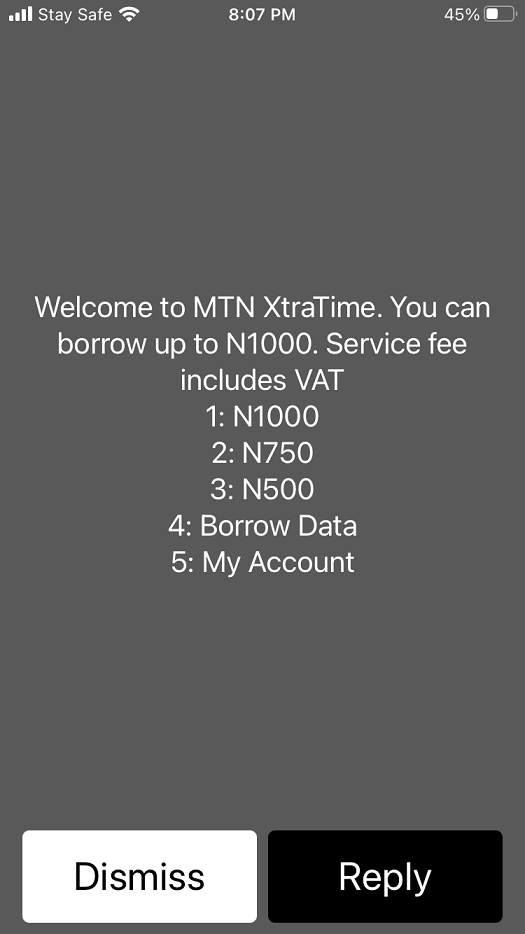
Note: The borrowed data is stored in a separate XtraByte account, not your main data balance. MTN will deduct the bundle cost plus the service fee automatically when you recharge next.
The USSD method is reliable for most situations, but if you're getting no response or prefer voice guidance, MTN has another option that works just as well.
Method 2: Borrow MTN Data via Voice Call (IVR Method)
Not everyone is comfortable navigating USSD text menus, and sometimes, network conditions can cause USSD sessions to time out or fail to load. That's where the IVR (Interactive Voice Response) method comes in. Instead of reading through a text menu, the system talks you through the process step by step, in your language of choice. It's a practical alternative, especially for users who find USSD menus a little confusing.
Follow these steps:
1. Open your dialer and call 303
2. The system will prompt you to select your preferred language.
3. Select your language
4. You'll be asked to choose between XtraTime (airtime) or XtraByte (data) — select XtraByte
5. The system will read out the available data bundles
6. Select your preferred plan
7. Confirm the transaction when prompted
8. You'll receive an SMS confirming your borrowed data
This method works exactly like the USSD option, with same eligibility checks, same 15% service fee, same instant crediting to your XtraByte account. The only difference is the experience: voice-guided instead of text-based. If you've never tried it, it's worth knowing it exists for moments when USSD just isn't cooperating.
For those who want the most user-friendly experience of all three methods, the MyMTN app takes it a step further.
Method 3: Borrow MTN Data via the MyMTN App
If you already use the MyMTN app to manage your account, borrowing data through it is a natural extension of that. The app gives you a clean, visual interface where you can see your options clearly, compare bundles, and confirm with a tap. It's particularly useful if you borrow data regularly and want a straightforward way to do it every time.
Here's what to do:
1. Download the MyMTN app from the Google Play Store or Apple App Store (if you haven't already)
2. Log in with your MTN number
3. Navigate to the "Borrow" or "XtraByte" section within the app
4. Browse the available data bundles
5. Select your preferred plan and confirm
6. The data will be credited to your XtraByte account instantly
Beyond borrowing data, the app also lets you track your data balance, monitor repayment status, and handle other account services, all from one place. It's a good habit to have the app installed even if you don't use it daily.
Now that you know all three methods to borrow data from MTN, the next step is understanding whether your line actually qualifies for XtraByte. Because not every MTN subscriber gets automatic access.
Like you borrow data on MTN, you can borrow data on Airtel from Nigeria, and you can borrow data on Glo also.
Requirements to Borrow Data on MTN in Nigeria
Before you attempt to borrow data, it's worth knowing what MTN looks at when deciding who gets access to XtraByte. MTN bases eligibility on your recharge behaviour, how long your line has been active, and whether you have any outstanding loans. Understanding these conditions upfront means you won't be caught off guard by an "ineligible" response at the worst possible moment.
Here's what you need to qualify:
• Prepaid customers only — XtraByte is not available to postpaid subscribers
• Registered MTN number — your SIM must be properly registered
• At least 3 months on the network — new SIM cards do not qualify; MTN needs to observe your usage history first
• Low main account balance — your airtime balance must be between ₦0 and ₦75 to be eligible at the time of borrowing
• Minimum monthly spend — you must have recharged at least ₦200 per month for the past three months
• No outstanding XtraByte loan — if you have a pending data loan, you must clear it before borrowing again
Your eligibility is reviewed automatically by MTN based on your recharge history, usage pattern, and how long your line has been active. Meeting all the criteria doesn't always guarantee access, as MTN may apply additional checks.
To check if you're eligible, dial *303#, select "My Account", then choose "Check Eligibility."
MTN XtraByte Service Fee and Repayment
Borrowing data on MTN is convenient, but it's not free. MTN attaches a service fee to every XtraByte transaction, and repayment happens automatically, whether you remember it or not. Knowing how this works helps you borrow smartly and avoid surprises when you recharge.
Service fee:
• MTN charges a 15% service fee (VAT inclusive) on the amount borrowed
• For example, if you borrow a data bundle worth ₦500, you'll pay back ₦575 (₦500 + ₦75 service fee)
Repayment:
• Repayment is automatic — there's nothing manual to do
• When you recharge your MTN line, the borrowed amount plus the service fee is automatically deducted from your recharge
• If the recharge amount doesn't fully cover the loan, MTN will deduct partially and clear the rest on your next recharge
• You are required to repay the full amount even if you didn't use all the borrowed data
Important points:
• When both your main data and XtraByte data are active, MTN will use XtraByte data first before touching your main balance
• There's no limit on how many times you can borrow, as long as you have no outstanding loan and still meet the eligibility criteria
- The fee is reasonable for an emergency fix, but it's something to factor in — especially if you're borrowing frequently. If XtraByte keeps getting declined even after you think you qualify, the next section covers exactly what to check.
What to Do If MTN Data Borrow Is Not Working?
There's nothing more frustrating than needing data urgently, dialing *303#, and hitting a wall. The good news is that most XtraByte issues have clear, fixable causes. Before you call customer care, run through these common reasons, chances are one of them is the issue.
• "You are not eligible" — Your line is likely less than 3 months old, your monthly spend hasn't hit ₦200, or you have an outstanding XtraByte loan. Check your eligibility by dialing *303# → My Account → Check Eligibility.
• Outstanding loan not cleared — You can't borrow again until your previous XtraByte loan is fully repaid. Recharge your line to clear it first.
• Airtime balance is above ₦75 — XtraByte only activates when your balance is between ₦0 and ₦75. If your balance is higher, MTN won't offer the borrow option.
• USSD code not responding — Try the IVR method (call 303) or use the MyMTN app instead. Network congestion can sometimes affect USSD responses.
• App issues — If the MyMTN app isn't loading the XtraByte section, close and restart the app or update it to the latest version.
• SIM not registered — If your SIM registration is incomplete or expired, some services including XtraByte may be restricted. Visit the nearest MTN service centre to resolve this.
If none of these fix the issue, contact MTN Nigeria customer care by calling 180 (toll-free on MTN lines) for direct support. Going through this checklist first usually saves you the wait.
Conclusion
MTN XtraByte takes the panic out of running out of data. With three methods available, borrowing data on MTN is quick, accessible, and works even without an internet connection. As long as your line meets the eligibility criteria and you have no outstanding loan, the whole process takes less than a minute. It's a practical service to know well, because data emergencies rarely come with a warning.
And when you're not sorting out your data, if you deal in gift cards, TradeCard is built for you. It's one of the most trusted platforms for gift card trading in Nigeria, with reliable rates, fast processing, and a secure experience from start to finish. Whether you're looking to offload an Amazon, iTunes, or Steam card, TradeCard is easily the best app to sell gift cards in Nigeria.
FAQs
1. What is the code to borrow data from MTN?
The current official USSD code to borrow data from MTN is *303#. After dialing, select XtraByte from the menu, choose your preferred data bundle, and confirm. This code replaced older codes like *606# following the NCC's harmonised USSD directive in 2023.
2. How do I know if I'm eligible to borrow data on MTN?
You can check your eligibility directly by dialing *303#, selecting "My Account," and then choosing "Check Eligibility." MTN will immediately tell you whether your line qualifies for XtraByte based on your usage history, recharge pattern, and how long your SIM has been active.
3. Can postpaid MTN customers borrow data?
No. MTN XtraByte is only available to prepaid subscribers. If you're on a postpaid plan, you won't see the XtraByte option. Postpaid customers already have a monthly data allowance included in their plan, which is why the borrow feature is restricted to prepaid lines only.
4. How do I repay my MTN data loan?
Repayment is fully automatic. When you recharge your MTN line, the system deducts the borrowed amount plus the 15% service fee from your recharge balance. You don't need to do anything manually. If the recharge amount is less than what you owe, MTN will do a partial deduction and clear the rest from your next top-up.
5. What is the minimum balance required to borrow data on MTN?
Your airtime balance must be between ₦0 and ₦75 for XtraByte to be available to you. If your account has more than ₦75, MTN considers you capable of buying data normally and will not offer the borrow option. This threshold is checked automatically each time you initiate an XtraByte request.