Everyone would have a friend or relative who recently got a new phone and went to insert your SIM card, only to find there's no SIM tray. Of course, they will panic and will blame life's decision of buying a broken phone for huge amounts of money.
Well, this can happen to anyone. So, if something like this happened, don't panic. You're not alone. Many have been in that exact situation, staring at their new device wondering if something went wrong. What actually happened is that your phone uses an eSIM, and trust me, once you understand how it works, you'll wonder why you ever dealt with physical SIM cards in the first place.
Here, we'll walk you through everything you need to know about eSIM activation, from what it is, to how to activate it on your iPhone or Android device right here in Nigeria.
What is an eSIM?
An eSIM, short for embedded SIM, is a digital SIM card built directly into your phone's hardware. There's no physical card to insert, no tray to open, and nothing to lose. Everything, like your phone number, network, and data plan, is stored digitally on a chip already inside your device.
What makes eSIM particularly useful is the flexibility it offers. You can activate a new line, switch networks, or add a data plan without stepping into a store. For people who travel frequently or need to manage more than one number on the same device, eSIM makes things a lot more convenient.
If you wanna know more, read our blog on what is an eSIM. The next important step is confirming whether your phone actually supports it. Because not every device does this. Let's get into it!
Which iPhones and Android Phones Support eSIM in Nigeria?
Before you try to activate anything, it's worth confirming that your device is eSIM-compatible. Trying to activate an eSIM on an unsupported device will get you nowhere, so let's clear this up first.
iPhones that support eSIM:
• iPhone XR and XS (2018) and all newer models
• iPhone 12, 13, and 14 series
• iPhone 15 and 16 series (note: iPhone 14 and later US models are eSIM-only with no physical SIM tray)
Android phones that support eSIM:
• Samsung Galaxy S21, S22, S23, and S24 series
• Google Pixel 3 and all newer Pixel models
• Motorola Razr series
• Select Huawei and Oppo models: check your specific model to confirm
Not sure if your phone supports eSIM? Here's the quickest way to check open your Settings, go to "SIM" or "Mobile Network," and look for an option that says "Add eSIM." If that option is there, you're good to go. If it isn't, your device likely doesn't support eSIM.
Now, let's move on to your major worry; How to activate eSIM on iPhone
How to activate eSIM on iPhone in Nigeria?
eSIM activation on iPhone is a clean, guided process. Major Nigerian networks like MTN, Airtel, and Glo, all support eSIM, so whichever network you're on, you have options.
Step 1: Visit Your Network Provider's Service Centre
Head to your network provider's nearest service centre and request eSIM activation. This is typically handled as a SIM swap. That is, our existing number is transferred from your physical SIM card to a digital eSIM profile. The agent will verify your identity, confirm your NIN is properly linked, and generate a QR code for you.
That QR code is very important. Don't lose it, don't screenshot it carelessly, and don't let anyone else scan it. It's single-use and tied specifically to your number.
Step 2: Add the eSIM to Your iPhone
Once you have the QR code, here's what to do:
1. Open Settings
2. Tap Mobile Service
3. Select Add eSIM
4. Choose Use QR Code
5. Scan the QR code provided by your network
6. Follow the on-screen prompts to complete the setup
Your iPhone will begin downloading the eSIM profile. This usually takes just a few seconds. Once it's done, your phone will connect to the network automatically.
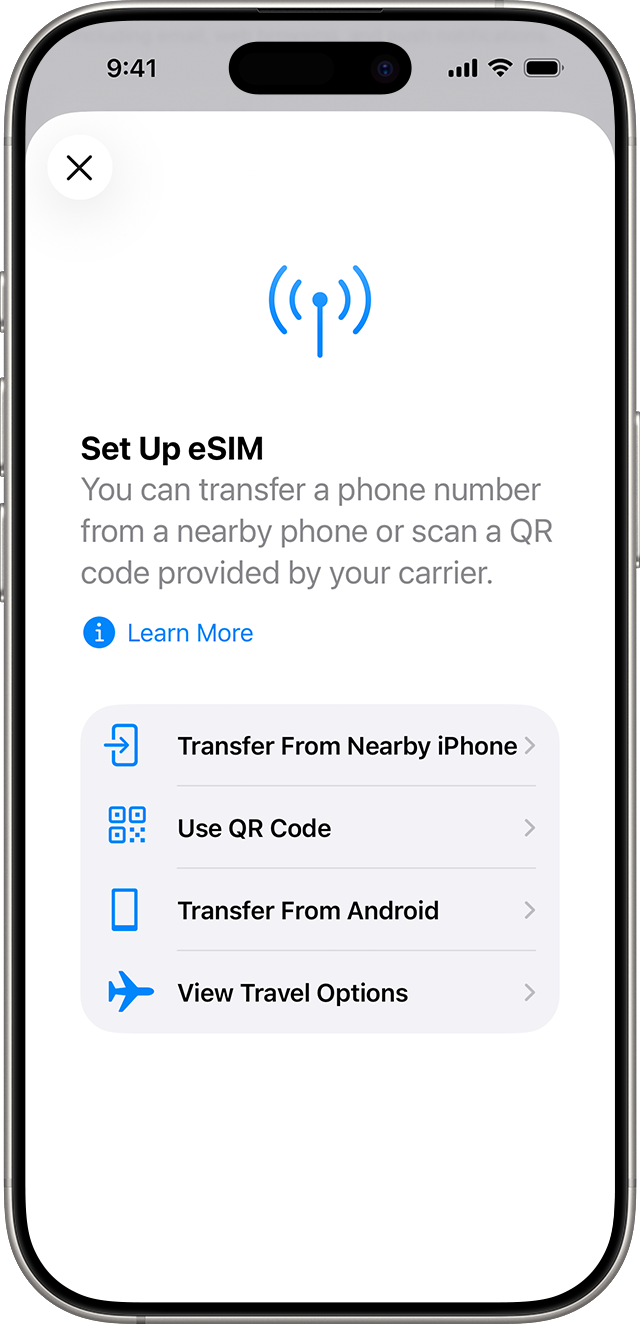
After activation, your iPhone will prompt you to label the line. You can name it something like "Primary," "Work," "Travel," or "Data", whatever makes sense for how you use it. This label helps you manage your lines easily, especially if you're running dual SIM with both a physical SIM and an eSIM active at the same time.
Expert Tip: Keep Wi-Fi turned on throughout the process to ensure the eSIM profile downloads without interruption. If your phone doesn't connect to the network right away after activation, simply restart your device. That resolves most hiccups.
iPhone done. Now let's walk through how it works on Android.
How to activate eSIM on Android in Nigeria?
Android eSIM activation follows the same core logic as iPhone. Get your QR code, scan it, and let the phone do the rest. The main difference is that menu names and navigation paths vary slightly between brands. The steps below work for most Android devices, including Samsung Galaxy and Google Pixel phones.
Step 1: Get Your QR Code
Visit your network provider and request eSIM activation. They'll confirm your details and hand you a QR code. If you're going the online route and purchasing a data-only eSIM from a platform like TradeCard, you'll receive your QR code digitally, right after completing your purchase. No physical visit is required.
Step 2: Activate the eSIM on Your Android
1. Open Settings
2. Tap Network & Internet or Connections (varies by brand)
3. Select SIMs or Mobile Network
4. Tap Add eSIM
5. Select Scan QR Code
6. Scan the QR code and confirm the activation
Once confirmed, your Android device will download the eSIM profile and connect to the network. The whole process usually wraps up in under a minute.
If your phone supports dual SIM, which most modern Androids do, you can head into your SIM settings to choose which line handles calls, which handles SMS, and which is set as the default for mobile data. This gives you full control over how both SIMs work together on one device.
Now that the activation steps are clear for both devices, let's talk about what are the requirements for eSIM activation in Nigeria.
Requirements for eSIM Activation in Nigeria
Getting your eSIM activated goes smoothly when you have everything in order beforehand. Most activation issues people face are not technical; they usually come down to missing one of the key requirements below. When everything is in place beforehand, the entire setup can take just a few minutes.
Here’s a detailed breakdown of what you need and why each step matters:
1. An eSIM-compatible phone:
This is the starting point. Confirm your device supports eSIM using the method above before going any further.
2. NIN linked to your phone number:
In Nigeria, your National Identification Number must be properly linked to your phone number for any SIM activation to work. If your NIN isn't linked, the activation will fail at the network provider's end. Confirm this before visiting any service centre.
3. A QR code from your provider:
This is essentially your eSIM key. Whether you're getting it from MTN, Airtel, Glo, or purchasing an eSIM from an online platform like TradeCard, you need this QR code to complete the activation.
4. A stable internet connection:
After scanning the QR code, your phone needs to download the eSIM profile. Make sure you're connected to Wi-Fi or have an active mobile data connection. Without internet access, the activation won't be complete.
Where to Buy an eSIM in Nigeria?
When it comes to getting an eSIM in Nigeria, there isn’t a one-size-fits-all option. The right choice depends on what you actually need. Whether it’s keeping your existing Nigerian number active or simply getting fast, flexible data access.
Broadly, you have two reliable routes to buy eSIM in Nigeria , and each serves a completely different purpose:
1. Nigerian Network Providers — For Local SIM Numbers
If you want to convert your existing Nigerian phone number to eSIM, your network provider's service centre is the place to go. MTN, Airtel, and Glo all offer eSIM activation at their centres. You walk in, request the swap, they verify your NIN, and you walk out with a QR code. Simple.
This type of eSIM keeps your Nigerian number active. Calls, SMS, and data all work just like your regular SIM, just without the physical card.
2. Online eSIM Platforms — For Data-Only and Travel eSIMs
If you don't need a Nigerian number and just want a flexible data plan, especially one for international travel or a secondary data line, online platforms are the smarter option. TradeCard offers the best eSIM plans that you can purchase and activate entirely online. You pick your plan, complete the purchase, receive your QR code, scan it on your phone, and you're connected. No queues, no service centre, no paperwork.
This is especially useful if you travel abroad and want to avoid expensive roaming charges, or if you just want a clean data-only eSIM for your phone or tablet without going through the full SIM swap process.
Conclusion
Activating an eSIM in Nigeria really comes down to one thing: getting your QR code and scanning it on your device. The steps are straightforward, the process is quick, and once it's done, you won't miss the physical SIM card at all.
If you're looking to skip the service center entirely and just want a flexible, data-only eSIM you can activate from your phone right now, TradeCard has you covered. Pick your plan, get your QR code, and you're online in minutes.
FAQ
1. How much does eSIM activation cost in Nigeria?
The cost varies by network provider. For local SIM swaps at MTN or Airtel, it's usually treated like a regular SIM swap with a small administrative fee. For data-only eSIMs from online platforms, the price depends on the data plan you select. Always confirm current pricing directly with your provider before visiting.
2. Can I use a data eSIM and a regular SIM at the same time?
Yes, you can, as long as your phone supports dual SIM. Most modern smartphones allow you to run one line for calls and SMS and a separate eSIM purely for mobile data. Head into your SIM settings to configure which line handles what.
3. Do I need my NIN to activate a data eSIM?
For local Nigerian number SIMs through MTN, Airtel, or Glo, yes, NIN is mandatory. For data-only eSIMs purchased from online platforms like TradeCard, NIN is generally not required, since these eSIMs aren't tied to a Nigerian phone number.
4. What if my QR code expires or stops working?
QR codes for eSIM activation are usually single-use and time-sensitive. If yours has expired or was already scanned, contact your provider, whether that's your network or the platform you bought from — and request a fresh one.
5. What happens if I factory reset my phone?
A factory reset will typically delete your eSIM profile. You'll need to re-scan the QR code or request a new activation code from your provider to restore it on your device.
6. Can I transfer my eSIM to a new phone?
Not directly. You'll need to deactivate the eSIM on your current device first, then request a new QR code from your provider, and complete a fresh activation on the new phone.